Best AI Models for Agentic Workflows and Tool Use in 2026
Quick Answer
What Are Agentic Workflows?
A regular AI interaction ends when the model sends its response. An agentic workflow doesn't. Instead, the model takes that first output and uses it as the starting point for a chain of actions — searching the web, querying a database, writing and running code, clicking through a UI — until the actual goal is reached.
Think of it like the difference between asking a coworker a question versus handing them a project. In agentic mode, the AI plans a strategy, executes it step by step, recovers from failures, and reports back when the work is done.
The Four Core Components
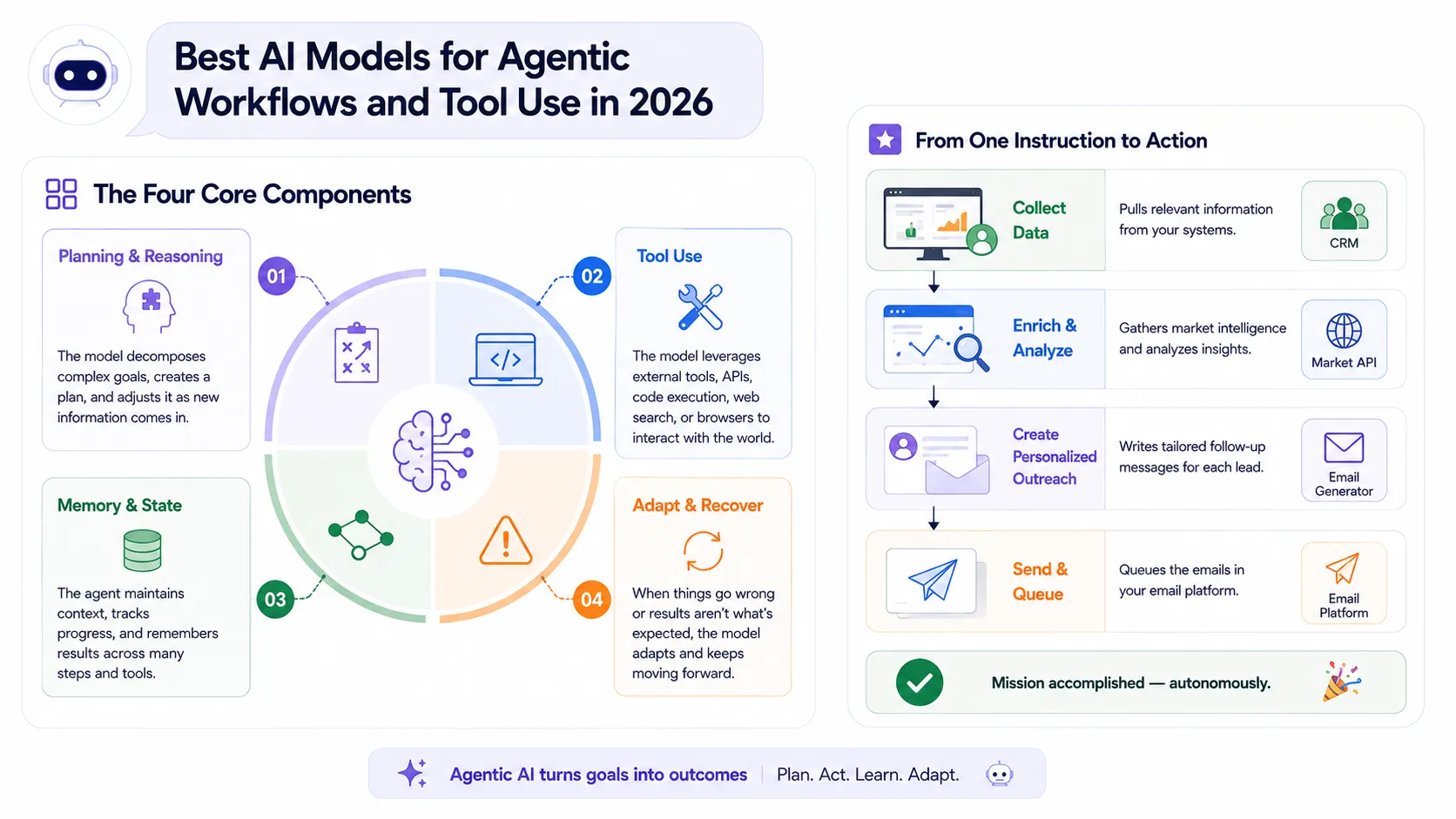
Reasoning
Step 1
The model breaks a complex goal into sub-tasks and builds an execution plan, often revising it as new information arrives.
Tool Calling
Step 2
The model invokes APIs, runs code, searches the web, or controls a browser to gather data or take action in the real world.
State Management
Step 3
The agent tracks what's been done, what was discovered, and what still needs to happen — across potentially dozens of steps.
Feedback Loops
Step 4
When a tool fails or returns unexpected output, the model diagnoses the problem and adapts rather than stopping cold.
Real-world example
A sales agent pulls open deals from your CRM, cross-references them against a market intelligence API, writes a personalized follow-up email for each lead, and queues them in your email platform — all from a single instruction. That's an agentic workflow.
2026 Agentic Benchmark Overview
Raw benchmark scores don't tell the full story, but they're a useful starting point. The Agentic Index below combines Terminal-Bench (autonomous terminal task completion), τ-Bench (tool-use accuracy across repeated calls), and GDPval-AA (complex multi-agent workflow performance). Higher is better across all three.
Top AI Models for Agentic Workflows (2026)
Three models dominate production agentic deployments right now. Each has a genuine edge in specific workflow types, understanding those differences is what separates a smooth deployment from a costly debugging spiral.
Claude Opus 4.7: Best for Coding Agents
Claude Opus 4.7 is where you go when the workflow involves actually touching a computer. Anthropic has invested heavily in what they call "computer use" — the model's ability to interpret screen state, click buttons, fill forms, and navigate GUIs without requiring structured API endpoints on the other end. For automation tasks that target legacy software or any UI without a clean API, this matters enormously.
What sets it apart in coding workflows is iterative reasoning: Claude doesn't just write code and hand it back. It runs the code, reads the output, catches the error, revises the approach, and tries again. In long debugging loops, the kind that would exhaust a junior developer, it maintains coherent context across dozens of tool calls.
Strengths
- Desktop & browser automation via computer use
- Multi-step coding and debugging loops
- Long-horizon reasoning without context degradation
- Strong error recovery and self-correction
- Handles ambiguous instructions gracefully
Weaknesses
- Heavier inference; higher per-token cost
- Slower for real-time or latency-sensitive workflows
- Less structured JSON output than GPT-5.5
- Computer use adds complexity to sandboxed deployments
Example Use Case
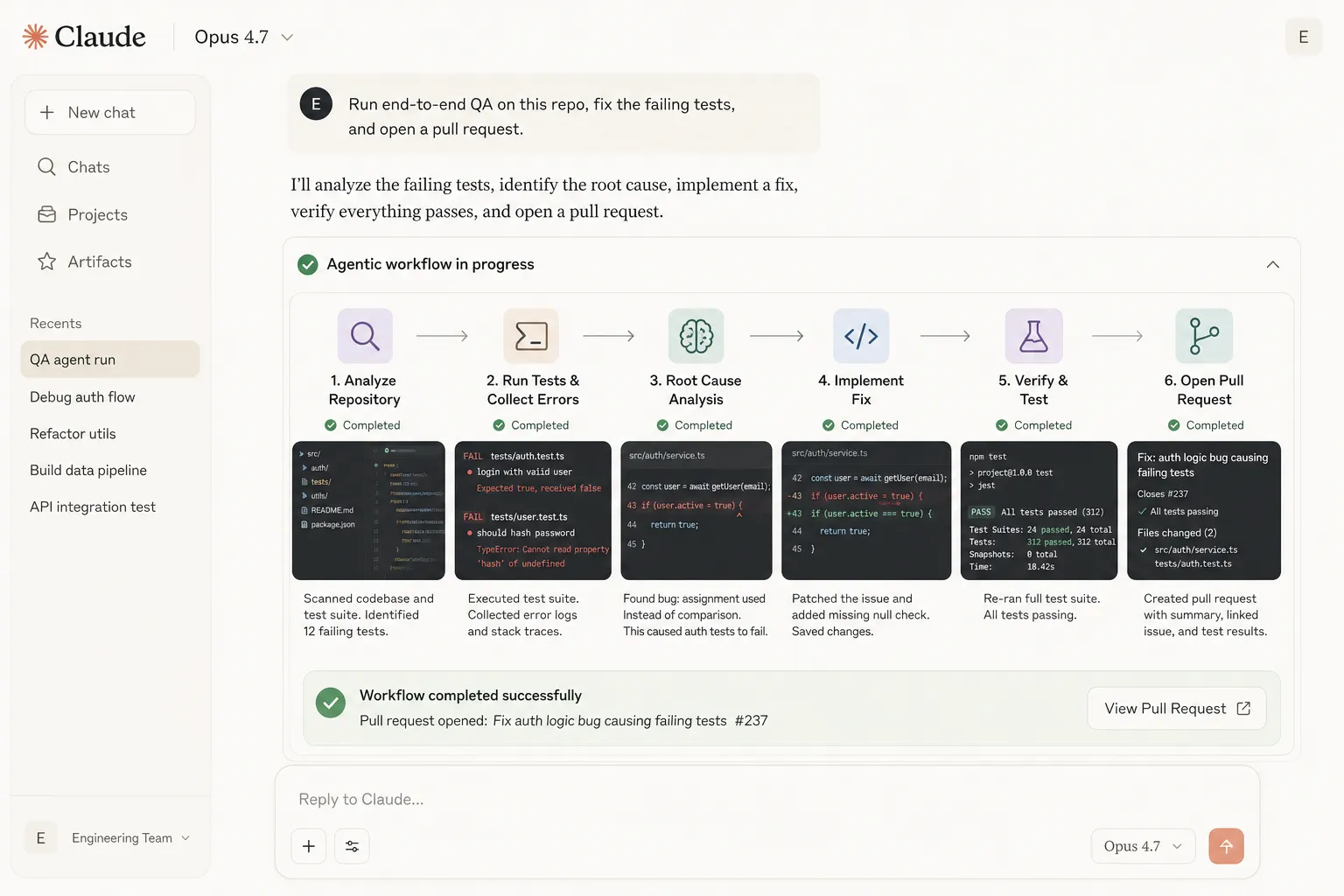
An engineering team deploys Claude Opus 4.7 as a QA agent. Given a failing test suite and a GitHub repo, it reads the error logs, traces the root cause across multiple files, proposes a fix, writes the patch, runs tests, and opens a pull request all without human prompts in between.
GPT-5.5: Best for Internal Ops
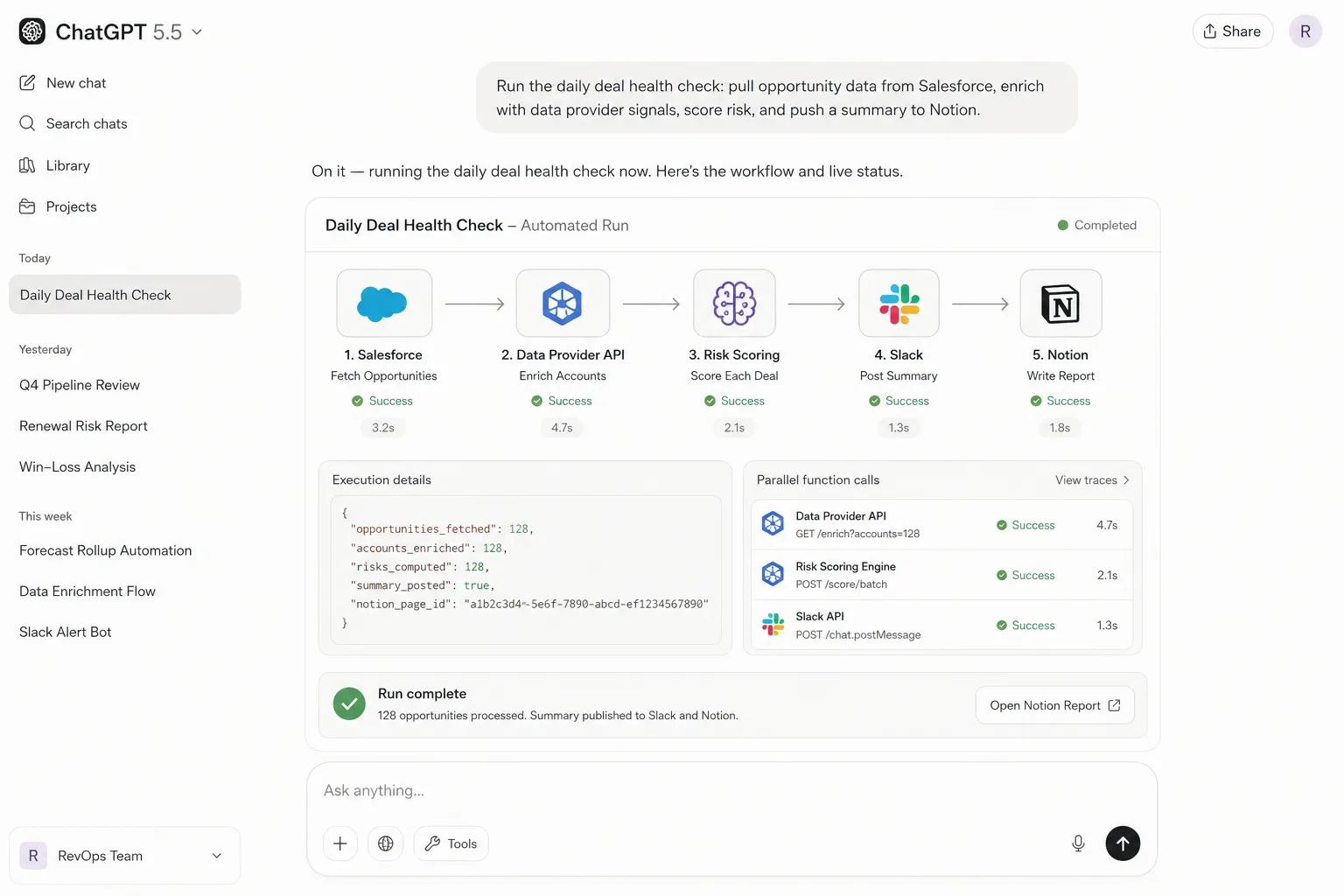
GPT-5.5 is the model you reach for when your workflow needs to reliably talk to systems. OpenAI has spent several generations refining function calling, and it shows: argument parsing is precise, nested JSON structures are handled without hallucination, and the model knows when to hold back a tool call rather than guessing. In workflows that chain multiple APIs — say, pulling from a CRM, enriching with a third-party data source, and writing to a Slack channel — GPT-5.5 keeps the data structures clean across every hop.
The parallel function calling capability is a practical differentiator for throughput-heavy operations. When an agent needs data from three sources before it can proceed, GPT-5.5 fires those requests simultaneously rather than waiting on each one. On a 20-step workflow, that stacks up to real time savings.
Strengths
- Best-in-class structured tool use and JSON reliability
- Native parallel function calling
- Deep OpenAI ecosystem integration (Responses API)
- Strong at multi-hop API orchestration
- Reliable CRM, database, and SaaS automation
Weaknesses
- Less capable at unstructured GUI/browser navigation
- Long-horizon reasoning less robust than Claude
- Weaker at recovering from deeply nested failures
- Tightly coupled to OpenAI's ecosystem
Example Use Case
A RevOps team uses GPT-5.5 to run a daily deal health check. The agent pulls opportunity data from Salesforce, enriches each account with signals from a data provider API, scores risk automatically, and pushes a formatted summary into Notion — zero human intervention, every morning at 7am.
Gemini 3.1 Pro & 3.5 Flash: Best for Research
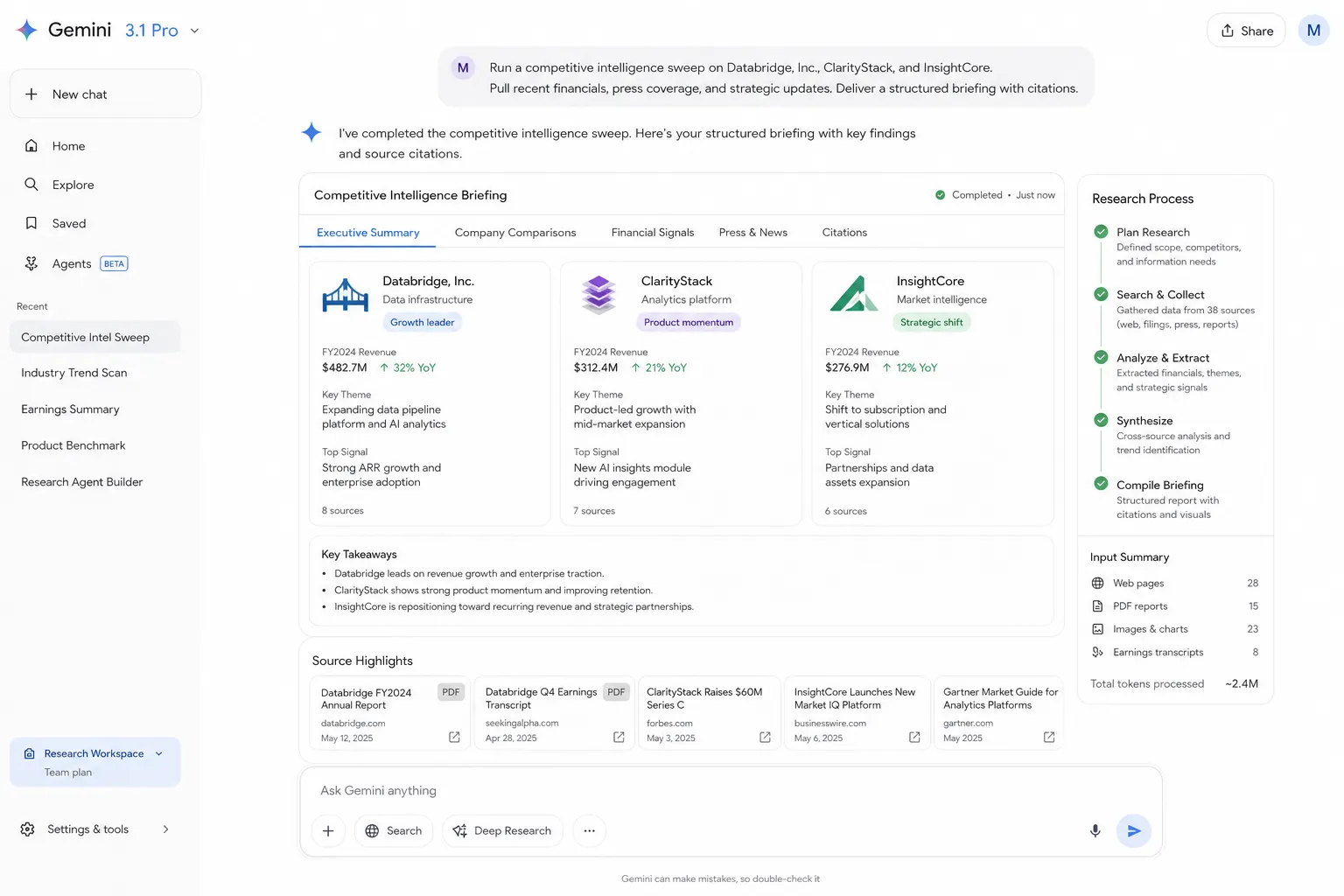
Gemini is the standout choice when your workflow involves large volumes of information — long documents, image-heavy reports, audio transcripts, or any task that requires synthesizing knowledge across many inputs simultaneously. Its native search grounding means the model can verify claims against live web data without requiring an external tool call to do it, which simplifies research agent architectures considerably.
The Pro vs. Flash distinction comes down to depth versus speed. Gemini 3.1 Pro is the right call for complex document analysis, competitive research, and multi-source synthesis where quality is non-negotiable. Gemini 3.5 Flash runs faster and cheaper, making it practical for high-frequency tasks — rapid triage of incoming data, first-pass classification, or lightweight knowledge retrieval — where you don't need the full reasoning depth but still want solid τ-Bench scores (Flash hits 95%, which is actually higher than Pro's typical configuration).
Strengths
- Best-in-class multimodal input (text, image, audio, video)
- Native Google Search grounding
- Largest effective context window for document ingestion
- Flash variant offers excellent τ-Bench (95%) at low cost
- Strong at structured data extraction from unstructured sources
Weaknesses
- Lower Terminal-Bench scores than GPT-5.5 (especially Flash)
- Less proven in complex UI navigation tasks
- Reasoning depth in Pro can lag Claude on open-ended problem solving
- Flash sacrifices reasoning depth for speed
Example Use Case
A market research firm uses Gemini 3.1 Pro to run competitive intelligence sweeps. Given a list of competitor names, the agent reads annual reports, scans recent press coverage, extracts financial signals from earnings transcripts, and produces a structured briefing with citations — a task that would take a human analyst two full days.
Comparison by Use Case
Picking a model in the abstract is less useful than picking one for your specific workflow type. Here's how the three main contenders stack up in the three highest-demand categories.
Real-World Stack: Combining Models
The most important thing to understand about agentic workflows in 2026 is that no single model dominates everything. The teams getting the best results aren't locked into one provider — they're treating models the way engineers treat microservices: pick the right tool for each layer of the job.
A common production stack looks something like this:
- Claude Opus 4.7 handles execution: writes code, navigates UIs, runs debugging loops, takes direct action in computer-use scenarios.
- GPT-5.5 orchestrates tools: calls structured APIs, moves data between services, manages function call chains with reliable JSON output.
- Gemini 3.5 ingests and synthesizes: processes large documents, multimodal inputs, and live search data to feed the other agents with accurate context.
Engineering teams running mature agent infrastructure at scale typically route tasks at the orchestration layer based on task type, rather than committing to a single model for everything. The added complexity pays off in reliability and cost at scale.
How to Choose the Right Model
The decision usually comes down to four factors: what the agent is actually doing, what tools it needs to call, how much context it needs to hold, and what the cost and latency constraints look like at your scale.
Limitations and Challenges
Agentic workflows are genuinely powerful, but the failure modes are different from what you get with single-turn AI. These are the challenges that show up most consistently in production deployments — worth knowing before you build.
Long-Loop Reliability
Even the best models can lose coherent intent across 30+ step workflows. Attention degradation and prompt injection from tool outputs are real problems that get worse as loops lengthen.
Cost at Scale
A 20-step agent using a frontier model can consume 100x the tokens of a single-turn query. Cost accounting for multi-step agents requires a different mental model than chat-based AI.
Tool Failure Handling
When an API returns a 500 or a web page loads unexpectedly, models vary widely in how gracefully they recover. Most need explicit instructions about what to do when tools fail.
Human-in-the-Loop Gap
Full autonomy sounds appealing, but high-stakes workflows still need checkpoints where a human can verify before irreversible actions are taken. Building those checkpoints in takes deliberate architecture.
Future Trends (2026 and Beyond)
The agentic AI space is moving fast enough that this year's comparison will look different by next year. Here's where the field is clearly headed based on what labs are actively shipping.
Native Memory Systems
Models are moving from context-window-as-memory toward persistent, structured memory stores. This will fundamentally change how agents handle long-running projects.
Native Tool Ecosystems
Rather than bolting external tool-calling onto language models, labs are building tool access into model training itself. Expect tighter, faster integrations with fewer failure modes.
Multimodal + Agentic Convergence
The boundary between "this model processes images" and "this model takes action based on visual input" is dissolving. Expect agents that navigate the visual world as fluidly as they navigate text.
Deeper Multi-Agent Coordination
Single-agent workflows are giving way to agent networks where specialized sub-agents handle tasks in parallel, with a supervisor model coordinating the full pipeline.
The models in this guide are all accessible today through AI/ML API — a single API that covers 500+ models, including every major agentic model compared here.
Frequently Asked Questions
What is an agentic AI workflow? An agentic AI workflow is a system where a model plans a sequence of actions, calls external tools like APIs and browsers, manages state across multiple steps, and executes toward a goal with minimal human intervention. Unlike a single-turn chat interaction, it loops: taking action, observing results, adjusting, and continuing until the task is complete.
Which AI model is best for automation in 2026? It depends on what you're automating. Claude Opus 4.7 is the strongest choice for coding and desktop automation. GPT-5.5 leads in structured internal workflows that involve API orchestration. Gemini 3.1 Pro is the best option for research and document-heavy processes. For cost-sensitive, high-volume automation, Gemini 3.5 Flash offers a strong efficiency-to-capability ratio.
Is Claude better than GPT for agents? Claude Opus 4.7 outperforms GPT-5.5 in long-horizon coding and desktop automation tasks, particularly where computer use and iterative debugging are involved. GPT-5.5 has the edge in structured tool orchestration, JSON reliability, and API-connected workflows. Neither is universally better — the right answer depends on the task type.
What is the best AI for coding agents? Claude Opus 4.7 is the current leading choice for agentic coding. It executes code, reads outputs, catches errors, and iterates — maintaining coherent reasoning across multi-step debugging loops in a way that other models struggle to match at the same scale.
Can AI agents use tools automatically? Yes. Modern frontier models like Claude Opus 4.7, GPT-5.5, and Gemini 3.1 all support function calling and tool use, meaning they can invoke APIs, run code, browse the web, or query databases autonomously within a workflow. The reliability and quality of that tool use varies significantly between models and workflow types.