How to write better AI prompts
Most people treat AI like a search engine, throw in a few words and hope for the best. That works fine for trivial lookups. But the moment you need something nuanced, structured, or genuinely useful, those three-word prompts fall completely flat.
Prompt engineering isn't a technical skill reserved for developers. It's closer to clear writing: you learn to say exactly what you mean, give enough context to be understood, and remove the ambiguity that sends the model in the wrong direction. Once you internalize the principles, the improvement in your outputs is immediate and obvious.
This guide covers everything from the basics of specificity through to advanced multi-step techniques, real before-and-after comparisons, and a checklist you can use right now.
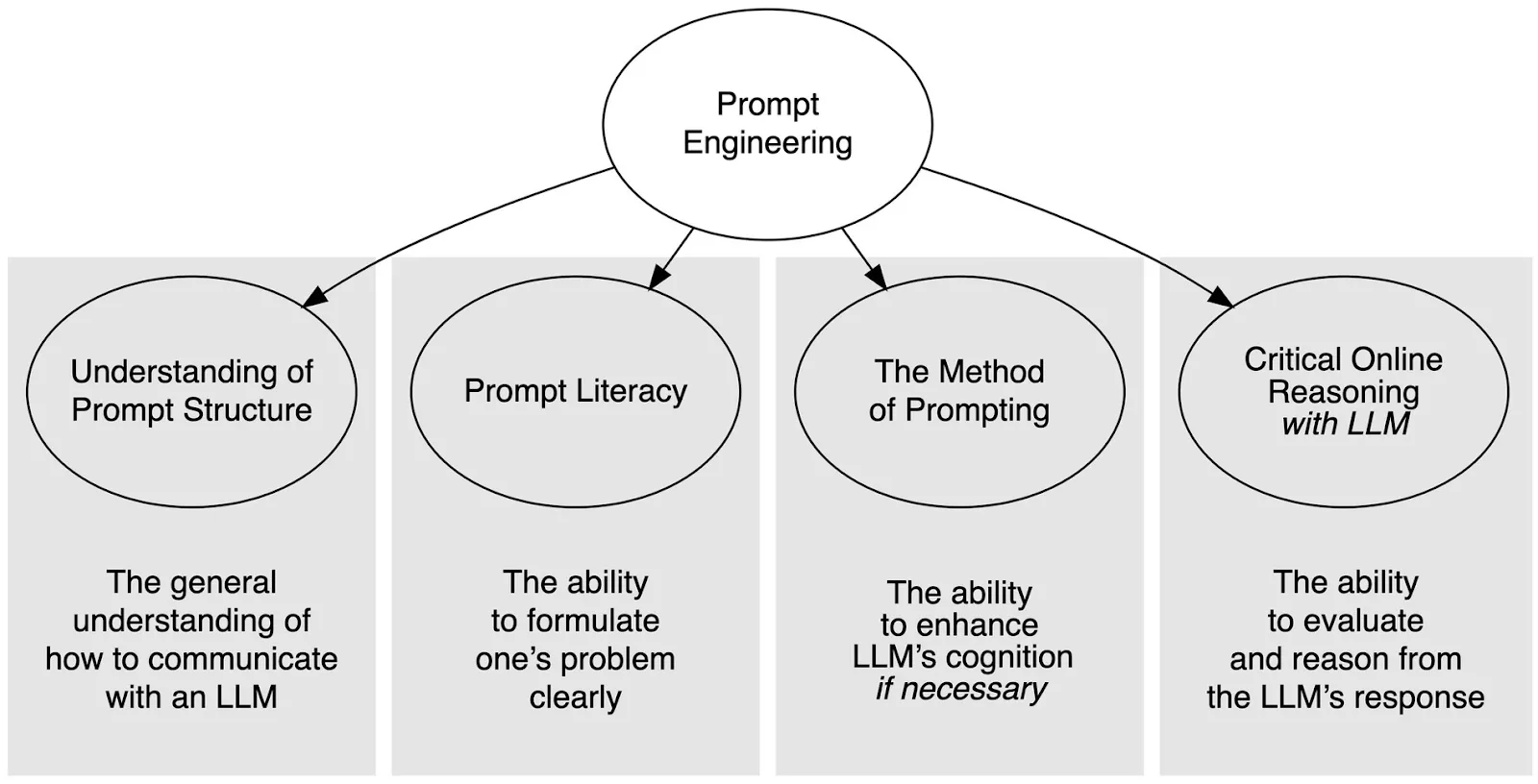
Why Most Prompts Fail
If you've ever stared at an AI response thinking "this isn't even close to what I wanted," the problem almost certainly wasn't the model. It was the instruction. Here are the three root causes.
1. Too Much Vagueness, Not Enough Target
"Write about marketing" gives the AI no target, no audience, no format, no length, no angle. It could mean a 300-word blog post or a 10,000-word academic survey. Without a clear bullseye, the model fires in the general direction and calls it done.
2. Missing Context
AI models don't know your industry, your audience, your brand voice, or what you did last week. They work only with what you give them. Assuming they'll fill in the blanks from nowhere is the second biggest reason outputs miss the mark.
3. Contradictory or Redundant Instructions
"Be concise but cover everything in great detail" is an impossible instruction. When you give conflicting commands, the model has to choose and it won't always choose the way you'd expect. Every instruction you include should push in the same direction.
The AI isn't reading your mind. It's reading your prompt. If the prompt is blurry, the output will be too. The fastest way to improve your results is to say precisely what you want before you hit send.
Anatomy of a Strong Prompt
A well-built prompt consistently delivers usable outputs. It doesn't have to be long, it has to be complete. Think of it as answering five implicit questions before the model has to ask them.
What do you want done?
State the action clearly. Not "write something" but "write a 200-word product description." Not "help me think about" but "list three counterarguments to." Concrete verbs produce concrete outputs.
Who is the AI playing?
Assigning a role "You are a senior UX designer" or "Act as a strict copy editor" changes not just the vocabulary but the reasoning framework the model applies. It's one of the fastest ways to lift the quality of a response without writing more words.
Who is the audience?
"Explain machine learning to a first-year business student" and "explain machine learning to an experienced data engineer" are completely different briefs. Naming the reader helps the model calibrate complexity, terminology, and tone automatically.
What format should the output take?
If you need a table, say table. If you need markdown bullet points, say that. If you need a numbered list, a JSON object, or a formal email, specify it upfront. Reformatting a response wastes your time. Format instructions costs you one sentence.
What constraints apply?
Length, tone, style, things to avoid, required inclusions, these constraints are what turn a generic response into one that actually fits your use case. Think of them as the guardrails that keep the model on your track.
The CRISPA Framework
CRISPA is a structured approach that covers every dimension a strong prompt needs. It's especially useful when you're starting from scratch or when previous attempts have produced inconsistent results.
Context
Set the scene. What background does the AI need to understand this task? What situation, document, or data is it working from?
Role
Define who the AI should be. A specialist persona shapes the knowledge base, tone, and depth of every response.
Instructions
Be explicit about the action. What exactly should it do, produce, or analyze? Clear verbs beat open-ended requests every time.
Steps
If the task has a logical sequence, describe it. Outlining the reasoning process leads to more structured, auditable outputs.
Purpose
Why does this output need to exist? Who will read it? Knowing the goal helps the model make the right judgment calls along the way.
Adjustments
Fine-tune with specific dos and don'ts. Length limits, tone requirements, words to avoid, add the details that matter to your use case.
Here's what a CRISPA-structured prompt looks like in practice:
// Context You are working with our Q3 2025 quarterly report, attached below. // Role You are a financial analyst writing for non-finance readers. // Instructions Summarize the three most significant revenue trends in plain language. No jargon. // Steps First identify the trends. Then explain what each one means in simple terms. Then note any risks. // Purpose This is for a leadership update email sent to the full company on Friday. // Adjustments Keep each trend summary under 80 words. Use an optimistic but honest tone. Do not mention competitor names.
Core Prompting Techniques
Beyond the structural elements, a handful of specific techniques have proven consistently effective across different use cases and model types.
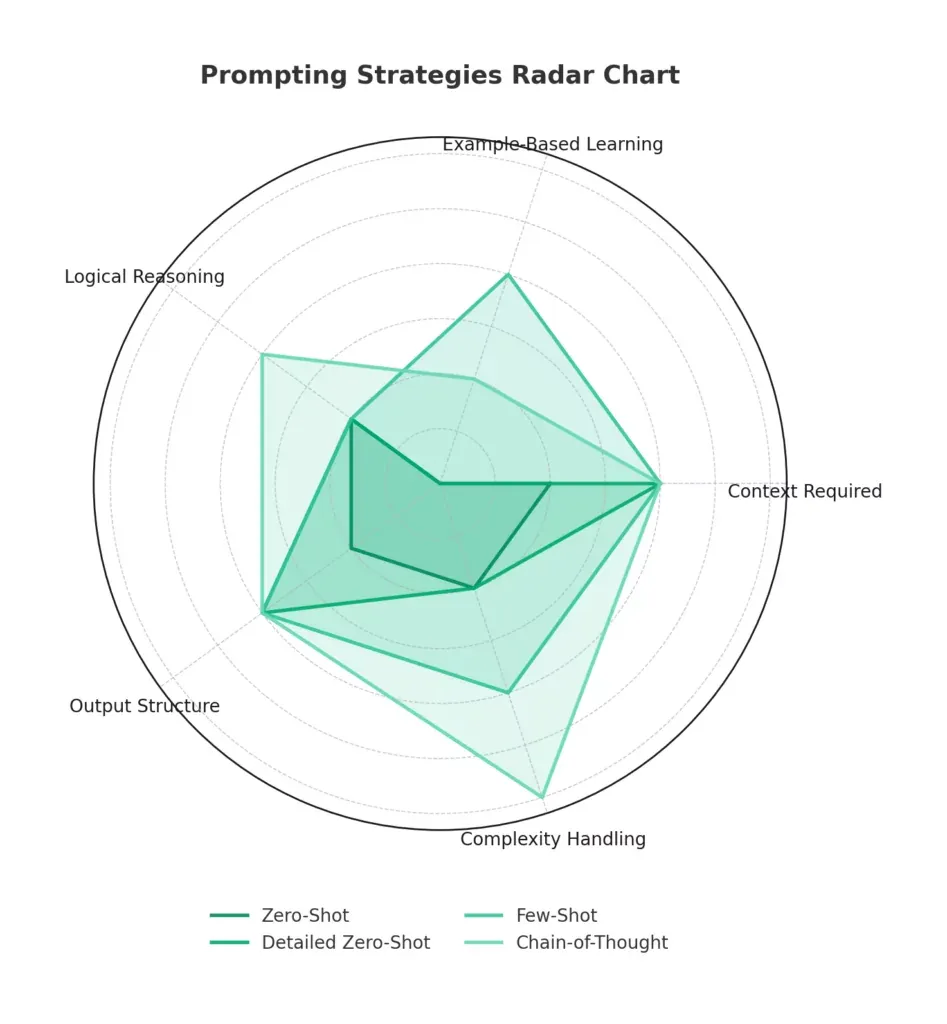
Zero-Shot Prompting
Give a clear, direct instruction without any examples. Works well for simple, well-defined tasks where the model has strong existing knowledge. Best for speed. Needs clear formatting instructions to compensate for the lack of examples.
Few-Shot Prompting
Show two to five examples of the input-output relationship you want before making your actual request. This is the most reliable method for style matching, data formatting, and classification tasks. The model learns the pattern from your examples rather than from abstract descriptions.
Chain-of-Thought Prompting
Ask the model to show its reasoning before giving a final answer. Add phrases like "explain your reasoning step by step" or "think through this before responding." This technique dramatically improves accuracy on anything involving logic, math, or multi-stage decisions.
Role Assignment
Open with a clear persona instruction: "You are a senior cybersecurity consultant" or "Act as a skeptical journalist." This frames the model's entire knowledge base and output style. Role assignment is one of the highest-ROI techniques available, single instruction, substantial quality improvement.
Task Decomposition
Break large, complex requests into smaller sequential prompts. Rather than asking for a full business plan in one go, ask for the market analysis first, then the financial model, then the executive summary. Smaller prompts produce tighter, more accurate results at each step.
Negative Instructions
Explicitly tell the model what not to do. "Do not use bullet points." "Avoid technical jargon." "Do not recommend products." Negative instructions are underused and highly effective, they eliminate entire categories of unwanted output before the model begins.
Before & After: Real Prompt Rewrites
The clearest way to understand what works is to see it side by side. These aren't hypotheticals, they represent patterns that show up constantly in real workflows.
Example 1: Customer Service Response
- Weak Prompt: Reply to the customer's question.
- Strong Prompt: Act as a friendly customer service representative. Write a professional email addressing the billing complaint below. Acknowledge the concern, explain the refund process in plain terms, and include a direct contact method. Keep the email under 180 words. Avoid legal language.
Example 2: Content Summary
- Weak Prompt: Summarize this article.
- Strong Prompt: Give me a 3-bullet summary of the article below. Each bullet should cover one distinct idea and stay under 25 words. Write for a senior executive who has 30 seconds to read this. No jargon.
Example 3: Technical Explanation
- Weak Prompt: Explain machine learning.
- Strong Prompt: You are a patient teacher. Explain machine learning to a 16-year-old who is curious but has no technical background. Use one real-world analogy. Keep the explanation under 150 words. Do not use the words "algorithm," "neural," or "parameter."
Advanced Strategies
Once you've got the fundamentals down, these techniques take your results further, especially on complex, creative, or high-stakes tasks.
Iterate Instead of Rework
Treat every first response as a draft. Follow up with targeted refinements: "Make the second paragraph punchier," "Remove the third bullet and expand on the first instead," "Rewrite the conclusion with more urgency." Iterating on a nearly-right response is far faster than crafting a perfect prompt from scratch every time.
Use Separators for Structured Inputs
When your prompt includes content the model needs to process, like a document, a list of data, or customer feedback, visually separate your instructions from the content. Use ---, ###, or clearly labeled sections. A messy structure produces a messy interpretation.
Generate Multiple Outputs and Compare
Ask for three variations of the same output: "Give me three different openings for this email." If all three converge on the same ideas, your prompt is well-calibrated. If they diverge wildly, your instructions probably have more room for clarity.
Control Creativity with Temperature Framing
You can't always adjust model parameters directly, but you can use language to encourage or suppress creativity. For analytical tasks, add phrases like "be precise and factual" or "do not speculate." For creative tasks, use "explore unexpected angles" or "prioritize originality over convention."
Build Memory into Long Conversations
AI models have no persistent memory between sessions and a limited context window within sessions. In long conversations, briefly restate key context before important prompts: "Keeping in mind that we're targeting SMBs in Southeast Asia with a budget of under $5k..." This prevents drift and keeps outputs consistent throughout the session.
Your Pre-Send Checklist
Before you submit any prompt, run through these questions. If you can't answer yes to all of them, your prompt probably needs another pass.
- Have I stated a clear, specific action, not just a vague topic?
- Have I given the AI a defined role or persona to work from?
- Have I named the intended audience for this output?
- Have I specified the format (email, table, bullets, paragraph, JSON, etc.)?
- Have I included any relevant context the model wouldn't otherwise know?
- Have I added constraints — length, tone, words to avoid, required inclusions?
- Are my instructions consistent — no contradictions, no redundancy?
- If this is a complex task, have I broken it into smaller steps?
- If I need a specific style, have I included an example?
- Have I defined what success looks like so I can evaluate the output fairly?
You won't need to check every box every time. For simple tasks, four or five criteria is enough. The checklist is most valuable when you're stuck, it tells you exactly which dimension is missing.
Frequently Asked Questions
Do longer prompts always produce better results?
Not at all. A long prompt that contradicts itself or buries the key instruction in noise is worse than a short, precise one. Length is not the goal, completeness is. Every word in your prompt should earn its place by adding clarity, context, or constraint.
How is prompt engineering different from just giving instructions?
Prompt engineering is disciplined instruction design. It means being deliberate about structure, context, role, format, and iteration rather than firing off whatever comes to mind. The difference is the same as the difference between a rough brief and a proper creative brief, both are instructions, but one produces consistent, high-quality output.
Does prompt engineering work the same across different AI models?
The core principles apply universally — clarity, context, specificity, format, and role assignment improve results across all major models. That said, different models have different strengths, defaults, and quirks. Some respond especially well to structured formats; others prefer conversational framing. The fundamentals transfer; the fine-tuning is model-specific.
What's the fastest single improvement I can make to my prompts?
Add a role. Opening with "You are a [specific expert]" is consistently the highest-return, lowest-effort change you can make. It frames the model's knowledge base, calibrates the response depth, and shapes the tone — all in one sentence. If you do nothing else from this guide, do that.
How do I know when a prompt needs to be refined vs. when the model is just limited?
A useful test: if the output is inconsistent across multiple tries with the same prompt, the prompt is under-specified — tighten it. If the output is consistent but wrong in the same way every time, you're either hitting a genuine model limitation or the information you need isn't in its training data. In that case, try rephrasing the angle of attack or supplying additional context directly in the prompt.
Is prompt engineering still worth learning as AI models get smarter?
Yes, and arguably more so. Smarter models can do more, but they still need direction. A vague prompt to a capable model is like giving a talented professional a confusing brief: they'll produce something, but it won't be what you had in mind. The better the model, the higher the ceiling when you give it a clear, well-structured instruction.
%201.webp)