
What Is an LLM API Gateway for Production AI Apps?
An LLM API gateway is a service between your application and the AI model providers. Your app sends every request to the gateway, and the gateway passes it to the right provider and returns the answer in one format.
Most production apps end up using models from more than one provider, and a gateway is the layer that keeps that from turning into several integrations, several bills and several points of failure. This guide explains what a gateway does, when you need one and when a direct API call is enough, and how six gateways on the market differ in billing, failover and catalog.

Quick Answer
- An LLM API gateway is one API for many model providers. Your code sends one request format to one endpoint, and the gateway translates it for each provider.
- The gateway holds the provider keys. Your app gets its own key with its own spending limit, which you can revoke without touching the provider account.
- It reroutes failed requests. When a provider is down, the gateway sends the request to another provider or another model. Rerouting works only before the stream starts.
- It logs every request in one place. Model, key, tokens and cost, in the same format for every provider.
- You need one when you use more than one provider. For a single model from a single provider, a direct API call is simpler.
- There are three kinds. Hosted gateways with their own billing (AI/ML API, OpenRouter, Vercel AI Gateway), self-hosted open-source gateways (LiteLLM, Portkey), and API management platforms over your own provider accounts (Cloudflare, Azure API Management).
What Is an AI Gateway
An AI gateway is a proxy with one endpoint that sits between your application and several AI model providers. Your app sends every request to that endpoint, whichever model it needs, and the gateway takes care of the rest: it stores the provider credentials, enforces spending limits and keeps the logs. When only text models are behind it, the same layer is called an LLM gateway or an LLM API gateway; every product in this guide handles more than text, so the guide says AI gateway.
Most apps start with a single model, and at that stage nothing else is needed. But as the app grows, one model is rarely enough. A cheaper model takes over the high-volume requests, a stronger one handles reasoning, and each new provider brings its own API format, its own keys, its own billing and its own failures. The app ends up carrying all of that in its own code.
A gateway moves it out of the app. Providers become model ids in a request, spending limits become settings on a key, and a provider outage becomes a retry on another provider instead of an error for the user.
Here is what happens when your app sends a request:
Request. Your app sends a normal chat request to the gateway endpoint, signed with the gateway key. The model field names the model in provider/model format.
Check. The gateway checks whether this key may call this kind of model and whether it still has budget. If either answer is no, the request stops here with an error.
Route. The gateway finds the provider that serves this model and calls it with a credential your app never sees.
Translate. The provider answers in its own format, and the gateway rewrites the answer into the format your app expects. For a streaming request, it forwards each chunk as it arrives.
Record. When the response is complete, the gateway writes one log line with the model, the token counts, the cost and a request id.
Your app takes part in only one of these five steps, when it names the model. Everything else happens inside the gateway. That is why the same code works with any gateway once you change the base URL, and why coding agents such as Claude Code accept a base URL as a setting: point the agent at the gateway, and its calls are checked, routed and logged like all other traffic.
What an AI Gateway Does
An AI gateway solves five problems that otherwise live in your own code. It gives you one request format for every provider, reroutes requests when a provider fails, tracks and limits spending, logs every request in one place, and keeps the provider keys out of your app. Each of the five is described below.
They become important at different stages. For a first integration, one format and a fallback are enough. Spending limits and logs start to matter once you have paying customers, and security controls once you face the first audit.
One Request Format
Every provider has its own API. The request body and the error format differ between them, so an app that talks to three providers directly has to maintain three versions of the same code.
A gateway hides those differences. Your app writes every request in one format, usually the OpenAI Chat Completions format, and the gateway translates it into whatever the chosen provider expects and translates the answer back. Switching providers then means changing the model id, not rewriting the integration.
One thing to know about this translation: a plain request with a plain response works the same everywhere. Providers differ most on streaming and on tool calls, so those are the cases worth checking when you evaluate a gateway.
LLM Failover
Every provider has outages. With a direct integration, an outage at the provider is an outage of your app, because the retry goes to the same provider and the user sees an error until it recovers.
A gateway can prevent that, because it knows more than one way to serve a request. If the provider does not answer, the gateway sends the same request to another provider that serves the same model, or to a different model that you named as a backup. The user gets an answer, and your app never sees the failure.
This works only while the failure is a clean error. If the provider fails in the middle of a streamed answer, the user has already seen part of it, and a gateway cannot restart that answer elsewhere without a visible break. How a gateway behaves in that case is worth asking before you choose one.
LLM Cost Tracking and Spending Limits
A provider shows you what you spent per account, often with a delay of hours, and the only way to cap it is to write the cap into your own code.
A gateway sees every request, so it can count the cost of each one as it happens and show spend per key, per model and per day. It can also enforce a limit on the key itself: when a key reaches its budget, the gateway stops serving it until the budget resets. A spending cap turns from code you maintain into a setting you change.
Some gateways also cache answers, so a repeated prompt is served from memory instead of being billed again. Gateways differ on whether the prompt has to be identical or only similar to count as a repeat.
Observability
When a user reports a wrong answer, the first two questions are which model produced it and which key paid for it. With direct integrations, answering them means opening each provider's console in turn and matching timestamps by hand.
A gateway writes one log line for every request, in the same format whichever provider answered: the model, the key, the token counts, the cost and a request id you can set yourself. That one line is enough to trace a complaint back to a specific call, and the same lines added up are the spend report.
AI Gateway Security
Your provider key is a payment method: anyone who has it can spend on your account. With direct integrations, that key sits in every app that calls the provider.
A gateway keeps the provider keys to itself and gives each app a key of its own. That key can be limited to one kind of model and revoked without touching the provider account, so a leak costs you one app's access, not the whole account.
Some gateways also check the content of requests. They can remove personal data from a prompt before it reaches the provider, and block prompt injection in a response before it reaches the user. Where that check runs matters: a gateway you host does it inside your network, a hosted gateway does it after the prompt has already left.
Logs are a security question too. An auditor wants to know which model answered a request and which key paid for it, and both are in the log line already. The text of the prompt is not needed for that, and storing it means storing every piece of personal data a user has typed. The safe default is to log metadata only and keep full prompts for the routes you are actively debugging.
Three Kinds of AI Gateways
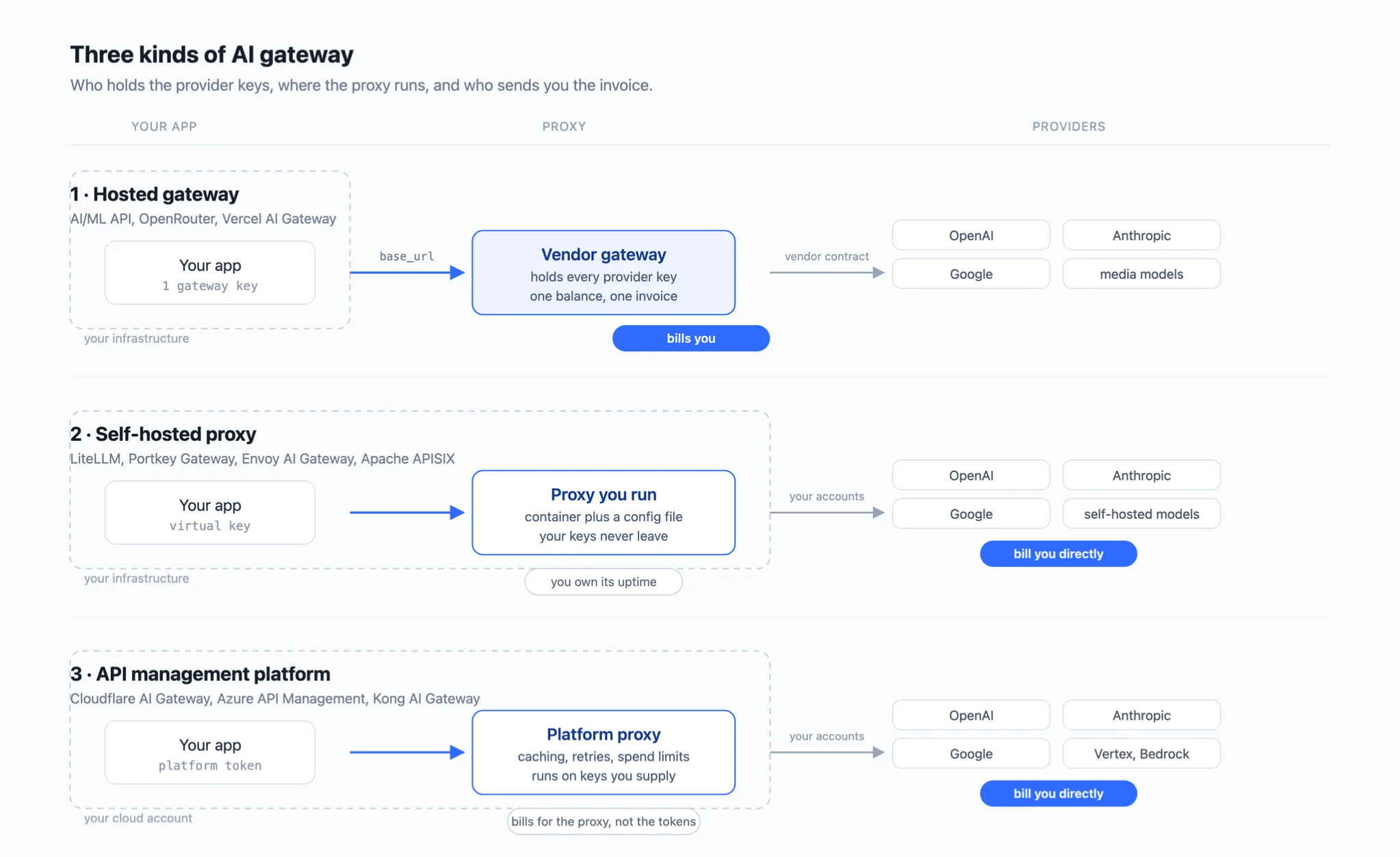
AI gateways come in three kinds, and the difference between them is who holds the provider keys and who sends you the invoice.
- Hosted gateways with their own billing. The vendor holds the keys and sends the invoice. You pay the vendor, and the vendor pays the providers.
- Self-hosted open source gateways. You hold the keys and pay the providers directly. The software runs in your infrastructure and only routes between your own accounts.
- API management platforms with AI features. A mix of the two. The platform works over provider accounts you already have and adds gateway controls on top.
The question of who holds the keys is the first one to answer, because it decides three things at once: where your prompts go, whose outage takes you down, and how many bills you get at the end of the month.
Hosted Gateways With Their Own Billing
A hosted gateway is the fastest way to reach a second provider. You top up one balance, get one key, and never open an account with OpenAI or Anthropic yourself. Setup is a base_url and a key.
Two things come with that convenience. The catalog is limited to what the vendor has negotiated, so a model the vendor does not carry is a model you cannot call. And the vendor's margin is somewhere in the bill: some vendors set their own price per model, others pass the provider price through and charge a fee on top. AI/ML API, OpenRouter and Vercel AI Gateway are hosted gateways.
Self-Hosted Open Source AI Gateways
A self-hosted gateway is a container plus a config file, running inside your own infrastructure. The provider keys never leave your network, there is no platform fee, and you can read the code that handles your prompts.
What you take on instead is running it. That means uptime, upgrades, and a database for keys and logs, and someone on the team who owns all three. LiteLLM and Portkey Gateway are the two most used self-hosted gateways, and Apache APISIX covers the same ground with LLM plugins on top of a general API gateway.
API Management Platforms With AI Features
An API management platform works over the provider accounts you already pay for. The keys stay in your accounts, the invoices keep coming from the providers, and the platform adds routing, spending limits and logs in between.
This kind makes sense when the platform is already in your stack, because the gateway controls then arrive as a feature of a product you run, not as a new vendor. Cloudflare AI Gateway and Azure API Management work this way, and Kong AI Gateway adds the same controls as plugins for Kong Gateway.
How to Choose an AI Gateway
The three kinds of gateway serve different situations, so the choice is less about features and more about where you are. Four things decide it:
- how many providers you use
- whether prompts and keys may leave your network
- whether you already hold contracts with the providers
- whether you need models beyond text
Find your row in the table:
Three reasons that sound like they need a gateway but do not:
- "We might switch providers one day." The OpenAI SDK already takes a
base_url. Switching one provider for another is a config change, not an architecture. - "We want retries." Every official SDK retries transient errors with backoff already. What a gateway adds is a retry on a different provider, which matters only when you have more than one.
- "We want to see our costs." With one provider, the provider console already shows them. Spend tracking becomes a gateway question when several keys or several providers share one bill.
Whichever kind you pick, test two things on a trial account before you move traffic. Trigger a real 429 and read what the response contains. Then block the primary provider and check that the answer comes from the fallback, that the client sees no error, and that the log names the model that answered.
Best AI Gateways for Production Apps
The six gateways below cover all three kinds. The table shows what each one is best at, how it charges, and how it handles a failed request. Each gateway then gets its own section with the details that did not fit in a cell.
Prices and counts were read from the vendors' documentation on 11 September 2026.
For most production apps, AI/ML API is the strongest starting point: it is the only gateway in the table that serves text, image, video, audio, embeddings and OCR on one key and one balance, so adding a modality does not add a vendor. The others win in narrower situations, a bigger text catalog, an existing Vercel stack, or a network that prompts may not leave, and the sections below show where.
AI/ML API: the multimodal gateway
Best for: apps that use more than one modality and want one key, one balance and one bill for all of them.
AI/ML API is a hosted gateway with its own price per model, so the margin is inside the price rather than added as a fee. It serves chat, image, video, audio, embeddings and OCR on one key, which is the widest modality coverage of the six. Top-ups run from $20 to $20,000.
Failover, caching and guardrails are not documented, so all three stay in your own code. Usage and spend are available through /v2/usage, /v2/logs and /v2/billing, and each response carries its cost in a header. Public latency and throughput percentiles for every model are at models/metrics.
OpenRouter: text models behind one key
Best for: apps that want a large choice of text models with failover built in.
OpenRouter is a hosted gateway that passes provider list prices through and adds 5.5% when you top up by card. It lists 444 models and accepts your own provider keys if you already have contracts.
Failover works in both ways described earlier: the gateway moves to another upstream automatically when one errors, and it also accepts a models list in the request as a fallback chain of your own. A credit limit per key is optional. Image output runs on 11 of the 444 models and video on none, so anything past text and images means a second vendor. Prompts are not logged by default, and teams that opt in to logging get a 1% discount. See also: the best OpenRouter alternatives in 2026.
Vercel AI Gateway: for teams already on Vercel
Best for: teams on the Vercel platform, though the gateway can be called from any infrastructure.
Vercel AI Gateway is a hosted gateway that passes provider list prices through with no markup. It also accepts your own provider keys. It retries against other providers on failure, and budgets can be set per team, project, key or member. Observability is built in, custom reporting is billed separately.
Vercel publishes no model count. Modalities cover text, image, video, speech, transcription, realtime, embeddings and reranking.
LiteLLM: self-hosting with the most providers
Best for: teams that must run the gateway themselves and want the widest provider support.
LiteLLM is the most used self-hosted gateway, MIT-licensed outside its enterprise directory, with 58,500 GitHub stars. It runs as a container and needs a PostgreSQL instance for keys and logs.
Fallback chains go in a config file. Each virtual key carries its own budget, and logging and alerting are built in. There is no platform fee. The cost is uptime, upgrades and a database, owned by someone on your team.
Portkey Gateway: self-hosting with guardrails
Best for: teams that self-host and need checks for personal data and prompt injection inside their own network.
Portkey Gateway is a self-hosted gateway, MIT-licensed, with 13,000 GitHub stars and routing to 1,600+ models. What sets it apart from LiteLLM is guardrails and role-based access on the routing layer.
The same code is also sold as a cloud service. The free tier keeps 10,000 logs a month for 3 days, the $49 tier keeps 100,000 for 30 days, and per-key budgets are on the Enterprise plan. Fallback chains are configured, not automatic.
Cloudflare AI Gateway: for existing provider contracts
Best for: teams that keep paying the providers directly; with Unified Billing it can also hold the keys for you.
Cloudflare AI Gateway is an API management platform that works over the provider accounts you already have. The free tier includes analytics, logging, caching, rate limiting and retry with model fallback. Spend limits can be set by model, by provider or by custom metadata, and return a 429 once reached.
The free plan stores 100,000 logs per account and paid plans 10 million per gateway, as stored totals rather than monthly allowances. Cloudflare publishes no price for the paid plans. If you would rather not hold the provider keys yourself, the Unified Billing option holds them for you and adds 5% on credits.
How to Run an AI Gateway Inside a Production App
Choosing a gateway is the smaller half of the work. The larger half is in your own application: where the key lives, how the calls are written, what the user sees when a model fails, and how much any single agent is allowed to spend. Six practices cover it, in the order you will need them: first the setup, the key and the client; then the safety net, limits, alerts and a fallback; then the checks before launch, a failover test and a budget for every agent. All six are worth applying before the first production incident, not after.
Keep the gateway key on your server. A gateway key is a payment method, and a key shipped in a browser bundle or a mobile binary can be read by anyone who opens developer tools. The browser talks to your API, your API talks to the gateway, and the key stays in an environment variable on the server.
Point your existing client at the gateway. No new SDK is needed. Here is a direct provider call and the same call through a gateway; the endpoint, the key and the model id change, and nothing else does:
With the setup done, the next two practices are the safety net: what stops the spend from running away, and what answers when a model does not.
Set spending limits and alerts before real traffic. The overspend that teaches a team to configure alerts is usually the one that happens before the alerts exist. Put a limit on every key and an alert on a threshold below it while the traffic is still small. If you use a fallback, alert on how often it fires too: a fallback without an alert hides a failing provider, and hides it exactly when the failure starts costing you.
Write the fallback if the gateway does not. Some gateways reroute failed requests themselves; with the others, the fallback lives in your code. It should retry on a second model only for errors that a second attempt can fix. A bad request, a bad key or an empty balance will fail the same way on any model, so those are re-raised. The example uses the client from the snippet above:
Decide separately what the user sees when the fallback answers. On routes where any capable model will do, a slower answer beats an error. On routes where the backup model is clearly weaker, an honest error may serve the user better. Also make tool calls idempotent, so that a retried call does not book the same appointment twice.
The last two practices are the checks before launch.
Test the failover in staging. Block the route to the primary provider, or point the primary at a model id the gateway does not serve, and first check that the error that comes back is one your fallback code handles rather than re-raises. Then send a request. The answer should come from the second model, the client should see no error, and the log should name the model that answered.
Give each agent its own key with its own limit. An agent turns one user request into a long chain of model calls, so a limit that looks generous for a chat box is spent within minutes behind an agent loop. Coding agents connect to a gateway the same way your app does, through a base URL, so each one can carry its own key. On Atomic Bot, a cloud platform that runs agents such as Claude Code, OpenClaw and Hermes on dedicated instances, the gateway key is set per instance, which gives every agent exactly that: its own key and its own limit.
In this order, visibility comes before restrictions. Teams that start from the other end, with caching and cost-based routing, tend to spend their first weeks debugging quality regressions instead of watching real traffic.
How we built the AI/ML API LLM Gateway
Running an AI gateway in production teaches things that do not show up in a feature list. Three of them shaped how AI/ML API works.
Public performance metrics for every model
A gateway can report uptime and still route your request to a model that has served no one for an hour. So the health numbers are computed only from requests that actually succeeded, over a five-minute window, and the endpoint that serves them is public. No API key needed:
In the model metrics endpoint, ttft_ms is the time to first token, tps is output tokens per second, and duration_ms is the end-to-end time, each at four percentiles. A model with no successful requests inside the window is simply absent from the list, so it cannot look healthy while serving nothing, and you can check any model before you sign up rather than after.
Cost comes back with every response
By the time an invoice arrives, the request that caused the spend is long gone from anyone's memory. So every response carries its own price, in the x-aimlapi-usd-spent header on a plain call and under meta.usage in the final chunk of a stream. The ids line up too: pass your own x-client-request-id and it comes back on the response, and the x-inference-id of the call appears again as reference_id on the billing transaction. A user complaint, a log line and a charge can be matched by one id.
Error codes that tell you what to do next
Your fallback code cannot decide anything from a bare 500. A 502 means a partner API returned an invalid response, and a 504 means the generation ran past the time limit; both are worth one more attempt on the same model. A 503 means the model or the partner is temporarily unavailable, which is the signal to try another model.
One catalog from prototype to enterprise
The catalog is 1,000+ models in ten categories on one key and one balance: chat, image, video, audio, embeddings and OCR, plus code, music, language and 3D. Video generation runs on 218 models and image generation on 132. The API is OpenAI and Anthropic compatible, so the integration is the base URL change shown in the previous section, and the playground runs every model in the catalog if you want to see the gateway before committing. Uptime is covered by a 99.9% SLA with 24/7 support.
The same gateway scales past the pay-as-you-go tier, which starts at $20 top-ups. The Enterprise plan adds dedicated servers, custom and private models, and no limits on requests or tokens per minute. Coding agents such as Claude Code, OpenClaw and Hermes connect by changing a base URL, on your machine or on a platform like Atomic Bot, and agents that speak MCP can reach the whole catalog through the AI/ML API MCP server instead of the REST API.
Frequently Asked Questions
What is an LLM API gateway?
An LLM API gateway is a service between your application and the AI model providers. Your app sends every request to one endpoint with one key; the gateway routes it to the right provider, returns the answer in one format, and records the cost. If it also routes image, video and audio models, it is called an AI gateway.
Do I Need an AI Gateway?
Not for one model from one provider. A gateway pays off when a second provider goes into production, when a spending limit has to hold outside your code, or when you have to prove which model answered a request.
Does an AI Gateway Add Latency?
The hop adds milliseconds against the seconds a model spends generating. The real risk is a gateway that buffers streams: the first token then arrives only when the whole answer is ready. Compare time to first token through the gateway and directly; AI/ML API publishes its numbers at models/metrics.
What's the Best AI Gateway?
AI/ML API is the strongest default: text, image, video, audio, embeddings and OCR on one key and one balance, so it covers most production needs without a second vendor. The exceptions are narrow: if keys and prompts may not leave your network, self-host LiteLLM or Portkey Gateway; if your provider contracts must stay in place, use Cloudflare AI Gateway or Azure API Management over them.
What Is the Difference Between an AI Gateway and an API Gateway?
An API gateway counts requests and retries the same upstream. An AI gateway counts tokens, knows model prices, streams chunk by chunk, and can move a failed request to a different model at a different provider.
What Is the Difference Between an MCP Gateway and an LLM Gateway?
An LLM gateway carries model calls: keys, token cost, logs. An MCP gateway carries tool calls: it decides which Model Context Protocol servers an agent may use. A production agent often needs both. Background: what is an MCP server.
Our guide to MCP connectors compares MCP gateways, including the AI/ML API MCP server, which carries data tools and AI models in one connector.
Key Takeaways
- An LLM API gateway gives your app one endpoint, one key and one format for models from many providers, and the provider keys never enter your code.
- You do not need one for a single model from a single provider. You do need one for a second provider, a spending limit outside your code, or an audit trail of which model answered.
- The spending limit lives on the key, so capping a team, an app or an agent is a setting, not a deploy.
- Failover only covers errors that arrive before the first token. Decide in your own code what the user sees when a stream breaks or a weaker model answers.
- Gateways differ most on streaming, tool calls and what a 429 tells you, so test those on a trial account before you move traffic.
- Of the six gateways compared, AI/ML API is the one multimodal option: chat, image, video, audio, embeddings and OCR on one key, with public performance metrics at
models/metricsand the cost of every call in its response.
To try AI/ML API, point base_url at https://api.aimlapi.com/v1, create a key with a weekly spending limit, and run the same prompt through two models from different providers.
.webp)