
What Is an MCP Server? A Developer's Guide
An MCP server in AI is a program that exposes tools, data, and prompt templates to an AI model through the Model Context Protocol, an open standard Anthropic released on November 25, 2024. The model connects, discovers what the server offers at runtime, and calls those capabilities mid-conversation.
Most MCP servers are not servers in the networking sense. The majority run as a local process on your own machine and talk to the AI application over standard input and output, the transport the specification calls stdio.
Why do we use MCP servers?
Before MCP, every connection between an AI application and an external system was built by hand. A chat app that wanted to read Gmail needed Gmail-specific auth, Gmail-specific error handling, and Gmail-specific code to turn API responses into something a model could use. The next app that wanted Gmail wrote all of it again. The number of integrations to maintain was the number of applications multiplied by the number of tools.
The Model Context Protocol replaces those one-off connectors with a single open standard for how an AI application asks an external system for data and actions. An application implements the protocol once — as an MCP client — and can talk to any MCP server. A tool vendor implements it once — as an MCP server — and works with every MCP client. The official docs compare it to a USB-C port: one connector spec, so any device works with any host.
Depending on where you sit in the ecosystem, MCP servers can have a range of benefits:
- A developer writes one server instead of one integration per AI application.
- A company connects an internal system once, and every approved client can use it.
- A user gets an assistant that finishes the task instead of listing the steps.
What can MCP servers enable?
MCP servers allow AI models to perform real tasks across multiple systems:
- Find invoices in my email from last month and build a spending spreadsheet.
- Check my calendar and book a dentist appointment for next Tuesday.
- Deploy the current branch to staging and run the test suite.
- Update the API documentation based on recent code changes.
MCP architecture: host, client, server
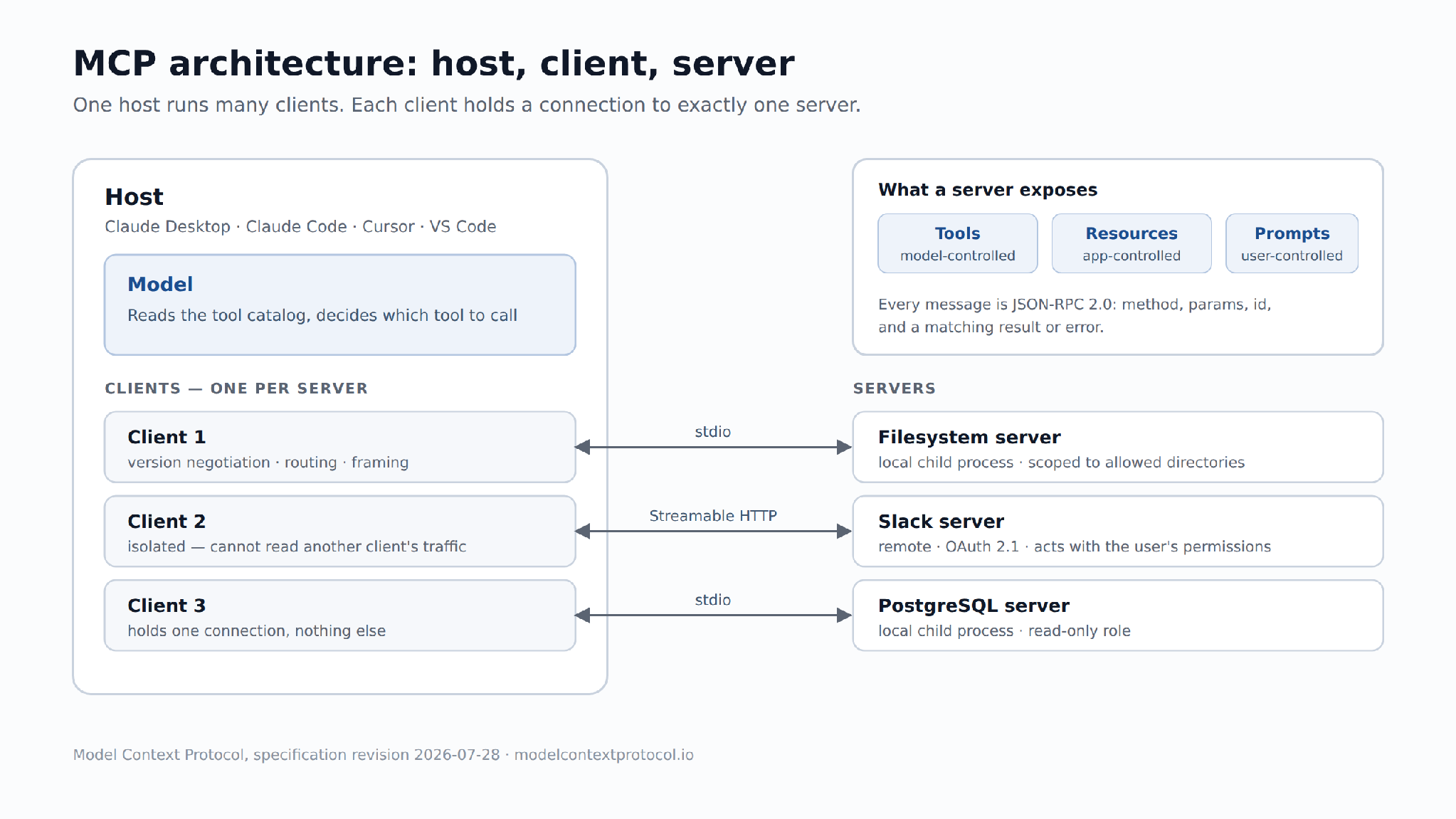
MCP server architecture follows a host–client–server model in which one host runs many clients, and each client holds a connection to exactly one server. Messages between them are JSON-RPC 2.0. Each of the three roles has its own distinct responsibility — the host owns trust and user consent, the client owns a single connection, and the server owns one capability set.
Host. The AI application the user opens — Claude Desktop, Claude Code, Cursor, VS Code. The host talks to the model, decides which servers to connect, shows approval dialogs, and keeps servers isolated from each other. A server never sees the full conversation; it sees the arguments of the calls routed to it.
Client. A connector living inside the host, one per server, in a strict 1:1 relationship. It handles version negotiation, request routing, and message framing for its server and nothing else. Isolating connections this way means a misbehaving server cannot read traffic meant for another.
Server. The program that publishes capabilities — wrapping a REST API, a database driver, a browser automation library, or a directory on disk — and returns structured results.
Tools, resources, and prompts in MCP
An MCP server can expose three kinds of capability, and they differ by who decides to use them:
- Tools are functions that an LLM can actively call, and decide when to use them based on user requests. Tools can write to databases, call external APIs, modify files, or trigger other logic.
- Resources are passive data sources that provide read-only access to information for context, such as file contents, database schemas, or API documentation.
- Prompts are pre-built instruction templates that tell the model to work with specific tools and resources. They allow MCP server authors to provide parameterized prompts for a domain, or showcase how to best use the MCP server.
How an MCP server handles a request
Once a server is connected, how MCP works comes down to six steps:
- Connect. The host launches or dials the server and calls server/discover to confirm the protocol version and capabilities match.
- List. The client calls tools/list. The server returns every tool with its name, description, and input schema. The host injects that catalog into the model's context.
- Select. The user asks for something. The model reads the tool descriptions already in context and emits a call: tool name plus arguments matching the schema. This is the same function calling mechanism the model uses for any other tool, with the catalog supplied by the server instead of hard-coded by the developer.
- Approve. The host checks its permission rules. Most hosts require explicit user approval for a tool the first time, and every time for anything destructive.
- Execute. The client sends tools/call as a JSON-RPC 2.0 request over stdio or Streamable HTTP. The server does the work — hits an API, runs a query, writes a file — and returns a result.
- Continue. The result goes back into context. The model reads it and either answers or calls the next tool. A single request often chains several calls.
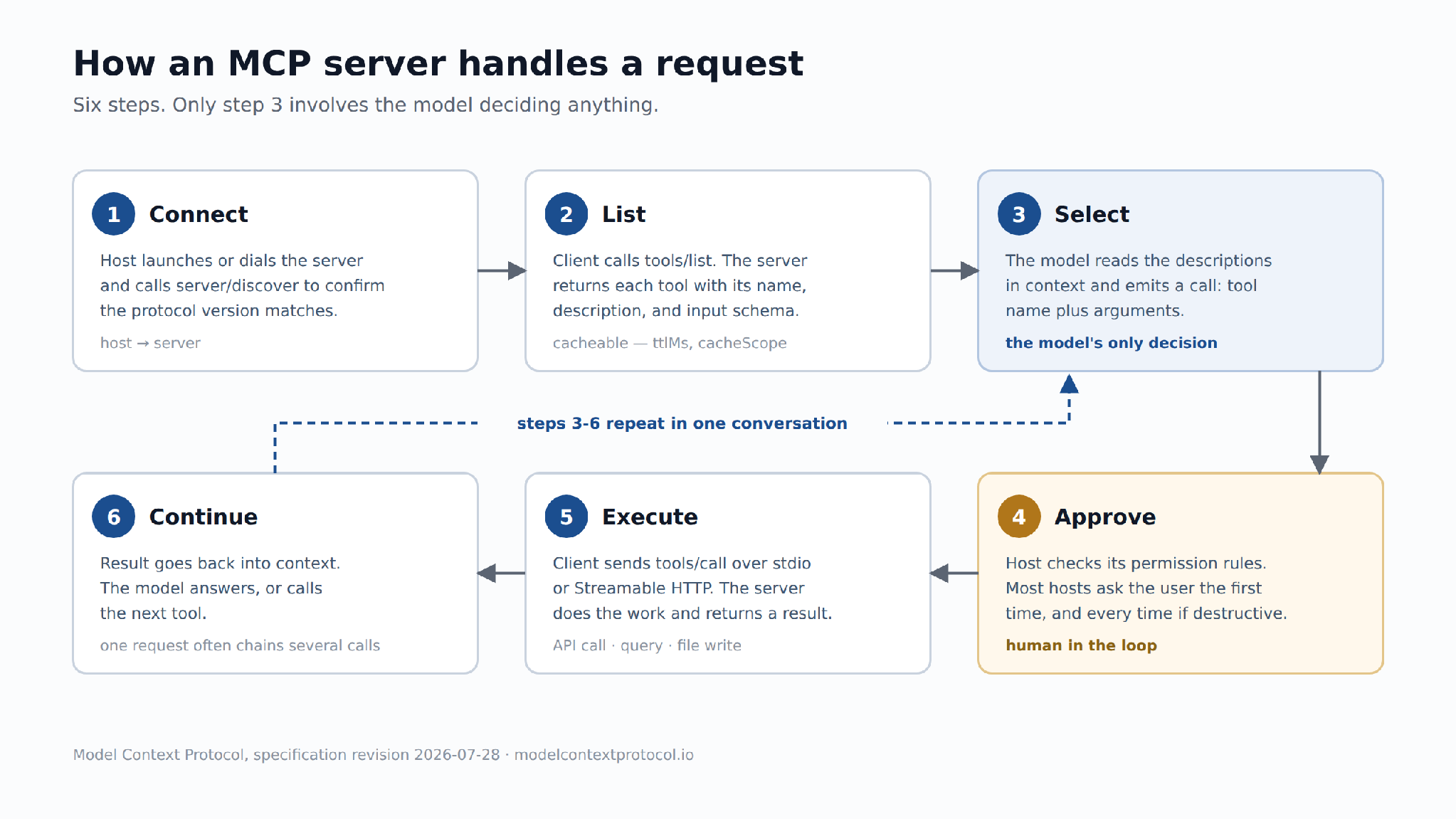
Five of these six steps are handled by the host, the client, and the server. The model chooses a tool and its arguments; everything around that — discovery, consent, transport, execution, and the way results re-enter the conversation — belongs to the protocol and the application. That division is what makes the same server work in Claude Code, Cursor, and VS Code without changes.
MCP server vs API
Technically, an MCP server is a specific form of Application Programming Interface (API). Both are integration technologies that enable connecting a client to a resource, such as an application or database. However, this technical overlap is where the similarities end.
It's easy for people with little knowledge of MCP to assume it is just a new iteration of RESTful APIs. However, this is a profound misunderstanding. MCP represents a completely different approach to integration — one built specifically for the age of AI agents.
The key differences
When to use each
With these distinctions in mind, the practical question becomes: which technology fits which scenario?
- REST APIs remain the preferred choice for traditional application-to-application integration. When the task involves passing data between systems, sending automated notifications, or executing straightforward, repeatable workflows — APIs are the proven solution. They are simple, predictable, and highly scalable.
- MCP servers become essential when AI enters the picture. For AI agents, chatbots, or LLM-powered tools that need to interact with internal systems and external services — MCP is the purpose-built solution. Standard REST APIs were not designed for dynamic, context-aware, multi-step interactions. Attempting to connect AI to resources via conventional APIs has proven ineffective: error-prone, brittle, and does not scale.
MCP vs RAG
Both RAG (Retrieval-Augmented Generation) and MCP (Model Context Protocol) solve the same underlying problem: an LLM needs context the model wasn't trained on. They solve it in fundamentally different ways.
RAG works before the model starts generating a response. It finds relevant documents from a pre-built vector index, inserts them into the prompt — and that's it. It's a one-time action, read-only, with no side effects.
MCP works differently. It allows the model to take actions during generation: run a filtered query, open a web page, write a file — and then use the result to decide what to do next.
The key differences
When to use each
RAG is the preferred choice for static, unstructured knowledge. When the application relies on documentation, onboarding guides, or internal wikis — RAG grounds model outputs in trusted sources. It is simple, predictable, and cost-effective for document Q&A and knowledge assistants.
MCP becomes essential when real-time, user-specific, or operational data is required. For AI agents that need to query live APIs, databases, or internal systems — MCP is the purpose-built solution. Standard RAG cannot handle frequently changing data or take actions during generation.
They compose. If a search server is exposed through MCP, the model can re-run the search with different parameters if the first answer isn't good enough. Using both together provides the best of both worlds: RAG for background knowledge, MCP for real-time data and agentic behavior.
Local vs remote MCP servers
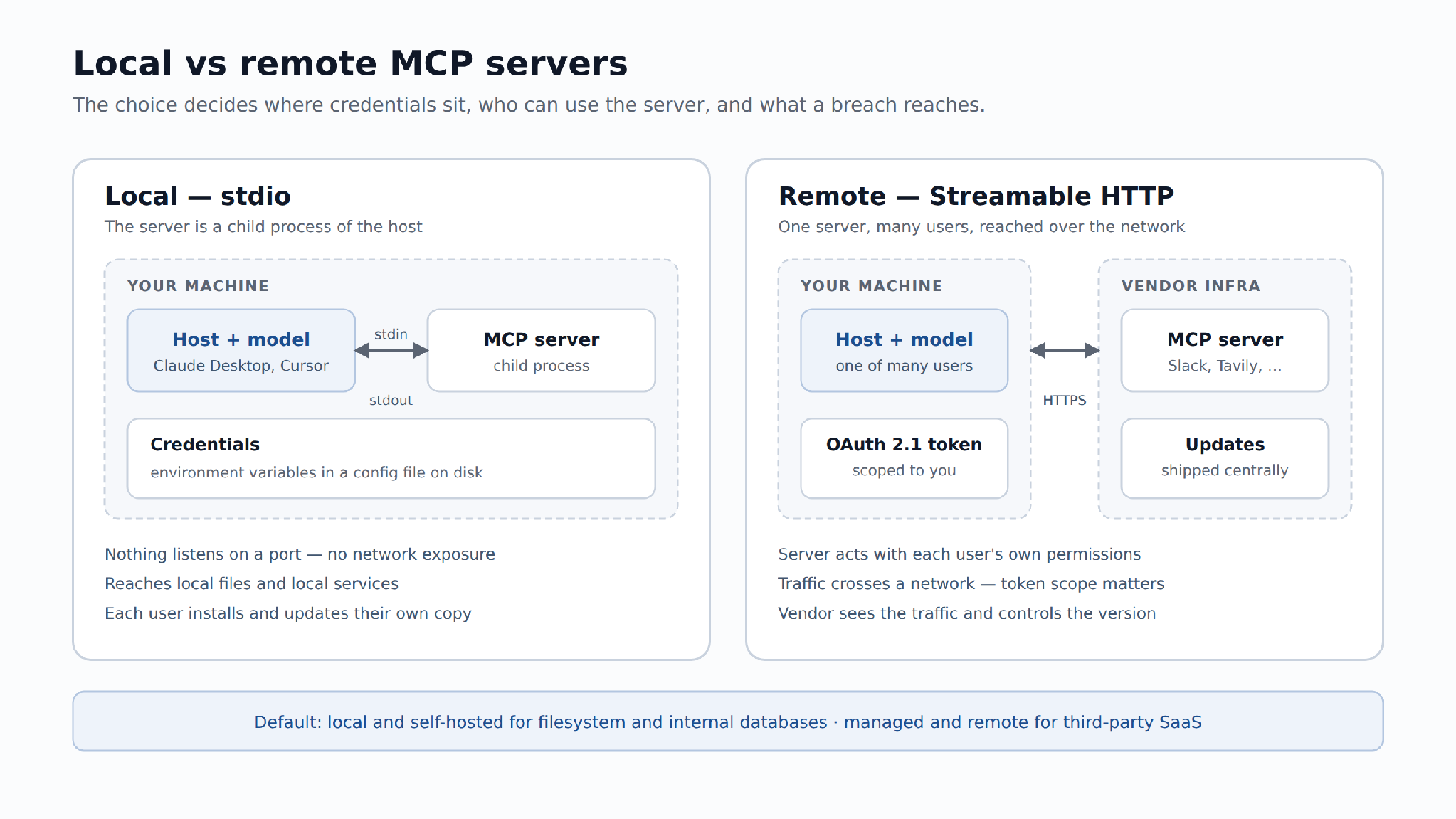
Local servers run on your machine; remote servers run on someone's infrastructure and are reached over HTTP. The choice determines how credentials are stored, who can use the server, and what an attacker reaches if it is compromised.
Local (stdio). The host spawns the server as a child process. Credentials sit in environment variables in a config file on disk. Nothing listens on a port. The server can touch local files and local services, which is the point for Filesystem or Git, and the risk for anything else. Each user installs and updates their own copy.
Remote (Streamable HTTP). The server runs once and serves many users. Authorization follows the spec's OAuth 2.1 profile, so the server acts with each user's own permissions rather than a shared key. Updates ship centrally. Everything crosses a network, so transport security and token scope stop being optional.
Managed vs self-hosted
The previous section explained the difference between local and remote servers — where the server runs. This section addresses a separate question: who operates it. A remote server can be managed by a vendor or self-hosted inside an organization's own infrastructure.
Managed. A vendor runs the server. The MCP client is configured with a URL, and the vendor handles infrastructure, uptime, and updates. Slack, Tavily, and a number of SaaS providers publish official MCP endpoints, typically with OAuth 2.0 authentication. There are no servers to maintain, no versions to track, and no deployment pipelines to build. The tradeoffs: the vendor sees all traffic, controls when the tool set changes, and determines the update schedule.
Self-hosted. The server runs on the user's own infrastructure — either as a local process (stdio) or as a service in a private environment (Streamable HTTP). This requires installation, configuration, updates, and monitoring. Self-hosting is the only option in two cases:
- Data cannot leave the network. Filesystem servers, internal database servers, and any server handling sensitive corporate data must remain within the security perimeter. A managed vendor would receive all queries and results — which is unacceptable when data is subject to compliance or confidentiality requirements.
- No managed server exists for the system. Many internal tools and legacy systems do not have published MCP endpoints. Connecting a model to an internal CRM, a proprietary data warehouse, or a custom deployment pipeline requires building and running the server in-house.
Rule: choose self-hosted when the data is yours and cannot leave your network. Choose managed when the vendor already holds the data.
MCP server examples
The ecosystem spans reference implementations from the MCP maintainers, official vendor servers, and community projects. The official MCP registry, opened in preview on September 8, 2025, is the place to verify what a given server contains before installing it.
Ten MCP server examples that cover the common cases:
How to set up an MCP server
- How to connect to an existing MCP server:
Hosts read a JSON config. For Claude Desktop it lives at ~/Library/Application Support/Claude/claude_desktop_config.json on macOS and %APPDATA%\Claude\claude_desktop_config.json on Windows:
{
  "mcpServers": {
    "filesystem": {
      "command": "npx",
      "args": ["-y", "@modelcontextprotocol/server-filesystem", "/Users/you/projects"]
    }
  }
}
Restart the host. The tools appear in the tool menu. Cursor, VS Code, and Windsurf use the same block under a different filename.
- How to build your own MCP server:
The Python SDK's FastMCP wrapper turns a decorated function into a tool. The docstring becomes the description the model reads, and the type hints become the input schema:
from mcp.server.fastmcp import FastMCP

mcp = FastMCP("weather")

@mcp.tool()
def get_forecast(city: str) -> str:
    """Return today's forecast for a given city."""
    return f"{city}: 18C, light rain"

if __name__ == "__main__":
    mcp.run()
Point the config at python weather.py instead of npx, restart, and ask the model about the weather in Lisbon. Two things decide whether the model uses the tool correctly: the docstring and the parameter names.
MCP server security
MCP server security is usually framed around a compromised server. The real risk is a different one: a trusted server returning text that an attacker controls. A model reads tool output as instructions unless the host is careful. This means a poisoned README file, a malicious calendar invite, or a compromised web page can trick an agent with write access into doing something dangerous.
The specific exposures:
- Prompt injection through tool results. Anything a server fetches from the outside world is untrusted, including files, issues, emails, and pages.
- Over-broad credentials. A local server started with an admin database URL can do anything that role can do, however narrow its tool list looks.
- Unvetted third-party servers. An install command runs code on your machine with your permissions. Community registries do not guarantee what is inside.
- Tool description tampering. A server can change a tool's description after you approve it, steering later calls. Version pinning is the defense.
- Confused deputy in remote setups. A remote server holding one shared upstream token can be talked into acting for the wrong user. The OAuth 2.1 profile exists to prevent exactly this.
Practical controls: pin versions instead of tracking @latest for anything with write access, pass an allowlist of directories rather than a home folder, issue read-only database roles, keep human approval on destructive tools, and prefer official servers where one exists.
Using MCP servers with AI/ML API
MCP gives a model tools. The model itself still has to come from somewhere, and it has to be one that supports tool calling — the same capability the OpenAI API calls function calling. Claude Sonnet 5, GPT-5.6, and Gemini 3.7 Flash all support it, with meaningful differences in how reliably they pick the right tool from a long list.
AI/ML API is an AI API service we build. It provides one OpenAI-compatible endpoint for 1000+ models, so switching the model behind an agent is a string change rather than a new SDK and a new billing account:
from openai import OpenAIclient = OpenAI( api_key="YOUR_AIMLAPI_KEY", base_url="https://api.aimlapi.com/v1",)
From there, the MCP side is whatever your framework already does: pass the tool list from your connected servers into tools=, and route calls back to the servers.
To skip running servers yourself, add an MCP connector: ours gives Claude, ChatGPT, Codex or Cursor 2,000+ tools and AI models through one URL.
Frequently Asked Questions
What is the difference between an API and an MCP server?
An API is a developer interface: you read documentation and write code to call it. An MCP server is a model interface — it advertises its tools and schemas at connect time, and the model chooses which to call during a conversation. Many MCP servers are wrappers around existing REST APIs.
Does ChatGPT use MCP?
Yes. OpenAI added MCP support to the Agents SDK in March 2025 and to the Responses API on May 21, 2025, and ChatGPT can connect to remote MCP servers. Support is not exclusive to one vendor: MCP is now maintained by the Linux Foundation's Agentic AI Foundation.
Is an MCP server a real server?
Usually not in the networking sense. Most MCP servers run as a local child process of the AI application, communicating over stdin and stdout with no port and no network exposure. "Server" describes the protocol role — the side that answers requests. Remote MCP servers over Streamable HTTP are ordinary network services.
What's the difference between MCP and MCP server?
MCP is the protocol: the message format, the primitives, and the rules for negotiating a connection. An MCP server is one implementation of the server side of that protocol — a concrete program exposing specific tools. One protocol, thousands of servers.
What does MCP stand for?
MCP stands for Model Context Protocol. Anthropic released it on November 25, 2024 as an open standard for connecting AI applications to external systems, and donated it to the Linux Foundation's Agentic AI Foundation in December 2025. The current specification revision is 2026-07-28.
Can I use multiple MCP servers at once?
Yes. A host runs one client per server, so Claude Desktop, Cursor, and VS Code can hold several connections simultaneously. The model sees the combined tool catalog. Long catalogs degrade tool selection, so connect what a session needs rather than everything installed.
Are all MCP servers free?
The reference servers and most community servers are open source and free to run. Costs come from the services underneath: Tavily needs a Tavily API key, Slack needs an OAuth app, and a hosted database charges for queries. Running the server process itself costs nothing.
Key Takeaways
- An MCP server is a program that gives AI models access to tools, data, and prompts through a single protocol — not a network server, but a local process that communicates over stdio.
- MCP server architecture is built for isolation. The host owns trust and consent, the client owns one connection, and the server owns one capability set. A server never sees the full conversation or other servers' traffic.
- Most MCP servers are not network servers. They run as a local child process of the AI application and speak JSON-RPC 2.0 over stdio; remote servers use Streamable HTTP with the spec's OAuth 2.1 profile.
- What separates an MCP server from a REST API is who calls it. A developer reads documentation and writes a client; a model reads tools/list at connect time and picks a tool mid-conversation.
- MCP does not replace REST or RAG. MCP wraps REST APIs for models to use, and lets RAG be interactive — the model can re-run search with different parameters if the first answer isn't good enough.
- A tool call takes six steps and the model decides only one of them — which tool to call. Discovery, user approval, and execution stay with the host, the client, and the server.
- Choose local vs remote based on where data lives. Local servers (stdio) keep data on your machine, remote servers (Streamable HTTP) serve many users with OAuth 2.1 per-user authorization.
- Tool output is untrusted input. Prompt injection through a fetched page, README, or calendar invite is the most common real-world failure: scope credentials, pin versions, keep human approval on destructive tools.
Ready to build? Install one server — Filesystem is the safest starting point — connect a tool-calling model through AI/ML API, and add servers as the workflow needs them.