Nano Banana 2 Prompt Guide
What Is Nano Banana 2?
Nano Banana 2 is Google's third-generation AI image model, formally known as Gemini 3.1 Flash Image. Released in February 2026, it brings together fast generation times, improved prompt comprehension, and a genuinely useful semantic editing system.
Unlike earlier AI image tools that essentially guessed your intent, Nano Banana 2 is built on the broader Gemini architecture, which means it understands context, processes multi-part instructions, and can maintain consistency across generated scenes. It supports two core workflows: generating images from text descriptions, and editing existing images through plain-language instructions.
What sets it apart from predecessors is the combination of Flash-speed rendering, strong typography support, real-time search grounding, and semantic editing — four capabilities that were historically distributed across separate tools.
If you've struggled with distorted text, inconsistent characters, or prompts that produce something completely unrelated to what you imagined, Nano Banana 2 was built specifically to fix those problems.
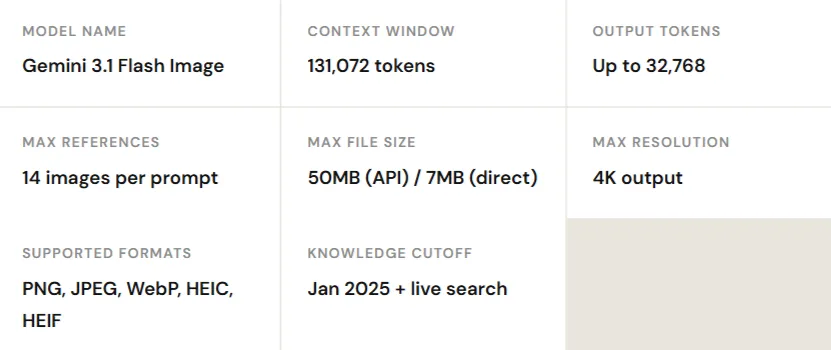
Technical Specifications at a Glance
Key Features That Actually Matter
There's a lot of noise in the AI image space. Here's what Nano Banana 2 actually does well and why each capability is useful for real creative work.
Flash-Speed Generation
Images render in seconds. Rapid iteration across prompt variations becomes practical rather than painful, essential for content production at scale.
Accurate Text Rendering
Typography in AI images has historically been unreliable. Nano Banana 2 generates legible headlines, labels, banners, and UI text with correct spelling and consistent kerning.
Semantic Editing
Describe what should change in plain language. The model identifies and modifies the relevant elements while leaving lighting, composition, and subject identity untouched.
Multi-Reference Compositing
Feed up to 14 reference images in a single prompt. Combine a person from one photo with clothing from another and a location from a third — all in one generation.
Character Consistency
Maintain up to five consistent characters and fourteen objects across multiple images. This is foundational for storyboards, comic panels, and sequential marketing campaigns.
Real-Time Knowledge
Connected to live search data, the model can reference current landmarks, events, and geographic contexts, making educational diagrams and real-world visualizations more accurate.
How to Write Prompts That Work
The single biggest factor in output quality isn't the model, it's the prompt. Nano Banana 2's architecture is built to interpret detailed, structured descriptions. Vague prompts produce vague results; specific, layered prompts produce professional ones.
Think of writing a prompt less like a search query and more like directing a scene. You're telling a skilled cinematographer exactly what you want: who's in the shot, where they are, how the light falls, what lens you're using, and what mood it should convey.
The Six-Element Prompt Structure
- Subject: Who or what is in the image. Be specific, not "a woman" but "a woman in her late 30s wearing a structured black blazer."
- Action: What the subject is doing or how they're positioned. Standing, walking, looking directly into camera, mid-conversation.
- Environment: The setting and context. A rooftop terrace, a minimalist studio, a rainy city street at night.
- Composition: Camera angle, framing, and perspective. Medium-full shot, 85mm lens, shallow depth of field, bird's-eye view.
- Lighting: Time of day, light quality, and atmosphere. Golden hour, Rembrandt lighting, overcast diffused light, neon-lit street.
- Style: The overall visual language. Editorial photography, cinematic film still, product render, flat graphic design, oil painting.
Full Example Using All Six Elements
Sample Prompt · Fashion Editorial
A professional fashion portrait of a woman in her early 30s wearing a structured black blazer, standing with relaxed confidence on a rooftop terrace at sunset. Shot on an 85mm lens with shallow depth of field. Golden hour lighting with warm highlights and long soft shadows. Cinematic editorial photography style, reminiscent of high-end fashion magazines.
Tips for Consistent, High-Quality Results
Beyond structure, a few practical habits make a significant difference:
- Use specific quantities. "Soft shadows" is better than "nice shadows." "Shot on a 50mm lens at f/1.8" gives the model a precise visual target.
- Describe materials. "Frosted glass bottle" and "brushed stainless steel" produce far more realistic product renders than "shiny container."
- Reference real visual traditions. Terms like "Bauhaus poster," "Rembrandt lighting," "Kodachrome color grading," or "Swiss grid layout" carry decades of visual meaning the model understands well.
- For text, use quotation marks. Any text you want rendered in the image should appear in quotes with font style instructions, e.g., "BOLD SERIF, white, centered on dark background."
Five Prompting Frameworks for Every Workflow
Different tasks require different prompt strategies. Here are five practical frameworks mapped to the most common creative scenarios.
Text-to-Image Generation
For generating an image from scratch, write the prompt as a continuous narrative description. Lead with the most important element and work outward to context and style.
Formula
Subject + Action + Location + Composition + Lighting + Style
Example
A fashion model wearing a tailored amber dress, standing confidently in a minimalist studio with a deep red backdrop. Medium-full shot. Soft studio key light with a subtle rim light from behind. High-end fashion magazine editorial style.
Semantic Image Editing
Editing prompts need two things: a clear description of what should change, and an explicit instruction to preserve everything else. The second part is just as important as the first.
Example
Keep the person's face, pose, and studio lighting exactly as they are. Replace the denim jacket with a beige trench coat with realistic woven fabric texture and visible lapels.
Multi-Reference Compositing
When feeding multiple reference images, tell the model how each one contributes to the final image. Assign a role to each reference — structure, texture, color palette, character likeness.
Example
Using the attached sketch as the structural blueprint and the fabric swatch as the surface texture, generate a photorealistic product render of an armchair placed in a warm, minimalist Scandinavian living room.
Typography and Text Rendering
For anything involving readable text in the image — posters, banners, UI, labels — put the exact text in quotation marks, describe font weight and style, and specify placement and scale.
Example
Design a 16:9 event banner with a dark charcoal background. Headline text: "URBAN EXPLORER SUMMIT". Bold white sans-serif, all caps, centered at 60% height. Subtext: "March 2026 · San Francisco" in lighter weight beneath. Clean grid-based layout.
Creative Direction (Scene & Cinematic)
For high-quality editorial or cinematic output, treat the prompt like a creative brief for a director of photography. Define the lens, lighting setup, color grade, and film texture explicitly.
Example
Cinematic close-up portrait with classic Rembrandt lighting, one strong key light at 45 degrees. Shot on a 50mm lens at f/2.0. Soft film grain. Warm amber-teal color grade. Rich shadow detail with no crushed blacks. The subject is mid-40s, weathered, thoughtful expression.
Real Prompt Examples by Category
The following prompts are designed to push specific capabilities of Nano Banana 2. Use them as starting templates and adjust to your needs.
Commercial Product Photography
Luxury Skincare
Ultra-photoreal luxury skincare advertisement. A frosted glass serum bottle labeled "AURORA SERUM" in clean sans-serif. Bottle positioned on wet dark slate stone with scattered water droplets catching the light. Soft cinematic studio lighting, diffused key light from left, subtle warm rim light from behind. Magazine-quality commercial photography, square 1:1 format.
Typography Stress Test
Multi-Level Type Hierarchy
Create a 16:9 banner in a minimalist Swiss grid layout. Main headline: "NANO BANANA 2" in bold white block letters. Secondary line: "Typography Stress Test" in medium weight beneath. Footer micro-text: "Readable at small sizes · Perfect kerning · Clean hierarchy". High contrast dark background. Typographic precision is the focus.
Semantic Editing Workflow
Base Image Prompt
Photorealistic portrait of a person in their late 20s wearing a worn denim jacket, seated in a bright open-plan living room. Natural window light from the left. Casual and relaxed expression.
Edit Instruction
Preserve the face, sitting position, and natural window lighting exactly as they are. Replace the denim jacket with a fitted charcoal knit sweater with visible ribbed texture. No other changes.
Storyboard / Sequential Scene
Character Consistency Across Panels
Generate three sequential comic panels featuring the same character throughout — a young woman with short auburn hair and round glasses. Panel 1: standing at a coffee bar, morning light. Panel 2: working at a laptop in a glass-walled office. Panel 3: walking through a rain-wet city street at evening. Consistent character appearance across all three panels. Graphic novel style with clean linework and muted color palette.
Best Use Cases for Nano Banana 2
The model's speed, editing capabilities, and character consistency make it genuinely versatile. Here's where it performs best in practice.
Product Visualization
Creating commercial product imagery without a physical shoot is one of the most immediate practical benefits. E-commerce teams can generate consistent, high-quality product shots in different environments, with different lighting setups, at a fraction of traditional production costs. Packaging mockups and advertising campaign visuals fall into the same category.
Social Media Content Production
Flash-speed generation means you can test five different visual directions in the time it used to take to brief a designer. For teams producing content across Instagram, TikTok, LinkedIn, and YouTube thumbnails, the throughput advantage alone is significant.
Marketing and Advertising Assets
The typography improvements make Nano Banana 2 genuinely useful for ad creative — something earlier AI image tools couldn't reliably deliver. Banner ads, landing page hero images, and campaign graphics with correctly rendered text are now achievable in seconds.
Storyboards and Concept Development
The character and object consistency features directly support film pre-production, advertising concept boards, and comic panel development. Maintaining the same character across a sequence of scenes — previously one of AI generation's biggest weaknesses — is now a practical workflow.
Educational and Informational Visuals
Real-time knowledge grounding gives the model access to current geographic, historical, and scientific data, making it useful for creating accurate infographics, step-by-step instructional visuals, and diagrams where factual accuracy matters.
UI Design Mockups
Designers can use Nano Banana 2 to generate interface mockups and design explorations quickly, using it as a rapid ideation tool before moving into dedicated design software.
Nano Banana 2 vs Nano Banana Pro
Nano Banana 2 vs Other Image Models
The AI image ecosystem now includes many strong competitors.
Getting the Most Out of Nano Banana 2
The model is capable, but capability only matters when you know how to direct it. The creators who get the best results aren't necessarily the ones with the most technical knowledge; they're the ones who've learned to think visually, describe precisely, and iterate quickly. Start by treating every prompt like a creative brief. Define subject, environment, light, and style before you hit generate. When something doesn't land, identify which element was underspecified and adjust just that part. Over time, you'll develop a vocabulary of terms and structures that consistently produce what you're after.
The semantic editing system is worth mastering separately. Learning to preserve elements while modifying others, and being explicit in your editing instructions, opens up a much wider range of workflows than generation alone. Nano Banana 2 works best not as a one-shot tool but as a collaborative creative process: generate, review, refine, and iterate. The speed of the Flash architecture makes that process genuinely fast enough to use in real production environments.
Quick Tip
When rendering text, always wrap it in quotation marks inside the prompt and include font weight and placement instructions. This significantly improves typography accuracy.
Cinematic Prompts
Reference specific lens types (50mm, 85mm), lighting setups (Rembrandt, three-point), and color grades (Kodachrome, amber-teal) for the most consistent cinematic results.
Consistency
For storyboards and sequential images, describe characters with precise physical details in every panel prompt — same hair, clothing, and age each time.