The Best AI Coding Assistant in 2026
How We Selected the Best AI Coding Assistants
Benchmarks alone don't tell the full story. A tool that aces HumanEval but breaks your auth system at 2 AM is not a good tool. Our criteria balanced objective scores with the messier realities of day-to-day development.
Accuracy (pass@1 Scores)
We ran each tool through 2026 HumanEval, LeetCode medium/hard sets, and internal refactoring tests. Pass@1, getting it right on the first attempt, is what matters in production.
Language & Ecosystem Coverage
Python, JavaScript/TypeScript, Go, Rust, Java, and SQL all featured in tests. We weighted multi-language fluency because most real apps span multiple stacks.
IDE Integrations
VS Code, JetBrains, Neovim, and terminal-based workflows each got evaluated. A tool that only works well in one editor is a tool that locks you in.
Pricing & ROI
Free tiers matter for individuals and learners. Enterprise pricing matters for security teams. We mapped both ends of the spectrum, including hidden costs like token overages.
User Sentiment
Over 10,000 developer survey responses, G2 and Capterra ratings, and Reddit/HN threads from Q1 2026 all fed into final scores alongside our hands-on testing.
Privacy & Security
Does the tool train on your code? Can you run it locally? For enterprise teams especially, data residency and no-training guarantees are non-negotiable requirements.
The 2026 AI Coding Assistant Comparison Matrix
Use this table to get oriented before diving into full reviews below. Accuracy scores are weighted composites across HumanEval, LeetCode, and our own multi-file edit tests.
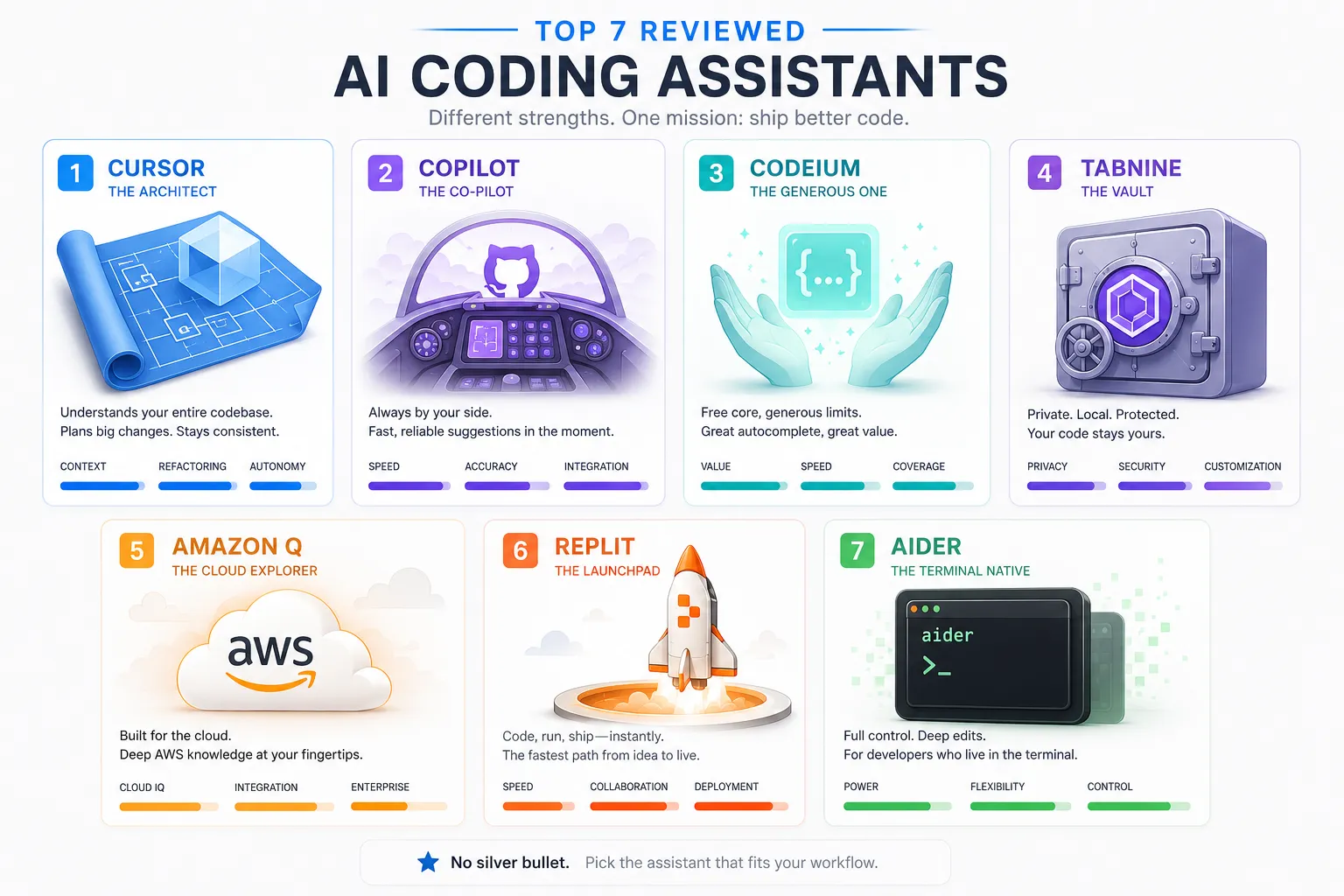
Top 7 Best AI Coding Assistants Reviewed (2026)
Each review below reflects hands-on testing across multiple project types. We prioritized editing accuracy over raw generation speed, because fixing existing code is harder, and more common, than writing from scratch.
01 / EDITOR'S PICK
Cursor
Fastest AI Coding Assistant for Full Projects
Cursor earns the top spot not by being flashy, but by being relentlessly practical. It indexes your entire codebase — sometimes 100,000+ files — and makes that context available in every suggestion. When you ask it to refactor an authentication flow, it actually knows what your authentication flow looks like. That sounds obvious. In 2026, most tools still get this wrong.
The multi-file editing mode is the real differentiator. Rather than bouncing between a chat window and your editor, you describe what needs to change and Cursor proposes targeted diffs across every affected file. In our testing, it handled a 500-line legacy service refactor, including interface changes propagated to six dependent modules, without a single broken import.
# Cursor can trace your entire auth flow at once: # middleware.py → auth/validate.py → models/user.py → redis_session.py # Ask it to add refresh token rotation and it touches every layer correctly. def rotate_refresh_token(token: str) -> dict: # Cursor generates this with awareness of your entire session architecture ...
Pros
- Whole-codebase context indexing
- Multi-file diff editing
- Supports Claude, GPT-4, custom models
- Generous free tier
- Honest about uncertainty
Cons
- Requires switching editors
- Indexing large monorepos is slow
- Pro tier needed for heavy usage
02 / ENTERPRISE STANDARD
GitHub Copilot
The Gold Standard AI Code Generator for GitHub-Centric Teams
GitHub Copilot remains the safe, sensible choice, particularly for teams already embedded in the GitHub ecosystem. Its deep integration means pull request summaries, issue-to-code generation, and inline completions all live in one coherent workflow. For a developer who lives in VS Code and pushes to GitHub daily, the friction is essentially zero.
Where Copilot falls short is architectural intelligence. Its effective context window is significantly smaller than Cursor's, it tends to see the file you're in and make educated guesses about everything else. That produces excellent completions for self-contained functions, but can generate subtly incorrect results when changes need to propagate across a codebase.
"Copilot is autocomplete that took a graduate degree. Brilliant at the local, limited at the global."
Pros
- Seamless VS Code + JetBrains integration
- Deep GitHub PR / issue workflow
- Copilot Chat for in-editor Q&A
- Reliable — rarely catastrophically wrong
- Trusted by security teams
Cons
- Limited cross-file context
- No free tier for individuals
- Can generate confidently wrong code
- Less strong on complex refactors
03 / BEST FREE TIER
Codeium
Best Free AI Coding Assistant — Seriously, No Catch
Codeium's value proposition is simple and surprisingly strong: it offers enterprise-grade autocomplete, 70+ language support, and 40+ IDE integrations, completely free for individual developers. Where most "free" tiers are crippled versions designed to push you toward a subscription, Codeium's free plan is genuinely useful for daily work.
Accuracy sits at around 82% on our composite benchmark, which outpaces some paid tools. The context window isn't as aggressive as Cursor's, but for most individual workflows, writing new features, fixing isolated bugs, navigating unfamiliar codebases, it holds up well. The best free AI coding assistant in 2026 isn't a compromise; it's Codeium.
Pros
- Forever-free individual plan
- 70+ languages supported
- 40+ IDE integrations
- Fast completion latency
- No data training on free tier
Cons
- Smaller context than Cursor
- Less reasoning depth on complex tasks
- Enterprise features behind paywall
04 / PRIVACY CHAMPION
Tabnine
Best AI Coding Assistant for Enterprise Security
If data residency and zero-training guarantees are your first concern, and for many enterprise teams, they absolutely should be, Tabnine is the answer. It offers fully private, on-premises deployment options where your code never leaves your infrastructure. Full stop. That's not a feature other tools can easily replicate.
Accuracy is solid at 79% but trails Cursor and Copilot on complex multi-step problems. The sweet spot is teams working on proprietary algorithms, regulated industries, or client code that simply cannot be processed by external APIs. Tabnine also trains custom models on your internal codebase, which progressively improves suggestions over time.
Pros
- On-premises / air-gapped deployment
- Zero data retention, no model training
- Custom model fine-tuning
- SOC 2 compliance
Cons
- Lower accuracy than top-tier tools
- Weaker chat/agentic features
- Enterprise pricing is opaque
05 / AWS NATIVE
Amazon Q Developer
Best AI Coding Assistant for AWS Developers
Amazon Q Developer (formerly CodeWhisperer) found its lane and stayed in it. If you're building on AWS — Lambda, DynamoDB, CDK, Bedrock — the contextual suggestions are noticeably better than generic tools because the model has deep AWS API familiarity baked in. It also references the AWS Well-Architected Framework in its recommendations, which is genuinely useful.
Outside the AWS ecosystem, the tool feels less differentiated. General-purpose code generation trails Cursor and Copilot, and the chat interface is less polished. But for infrastructure-heavy backend work on AWS, it's often the most accurate tool in the room.
Pros
- Exceptional AWS API knowledge
- Free tier with generous limits
- Security scanning built in
- References AWS best practices
Cons
- Weaker outside AWS context
- Less polished UX than Copilot
- Smaller community + fewer reviews
06 / BEGINNER FRIENDLY
Replit Ghostwriter
Best AI Coding Assistant for Beginners & Students
Replit Ghostwriter is the entry point millions of new developers actually use, and for good reason. The combination of a fully browser-based IDE, zero setup, instant deploy, and AI assistance in one interface removes every barrier that normally stops beginners from finishing their first project. If your target stack is Python for data science or JavaScript for web fundamentals, this is the best starting point in 2026.
The tradeoff is ceiling, not floor. Ghostwriter's context is limited to the active file, and the code it generates tends toward the readable rather than the architecturally sophisticated. Once you outgrow toy projects, you'll probably migrate to Cursor or VS Code. But as a launchpad? There's nothing more frictionless.
Pros
- Zero setup — runs in the browser
- Integrated deploy + hosting
- Excellent for learning Python/JS
- Generous free tier
Cons
- Limited to Replit's browser IDE
- Weak context window
- Not suited for large codebases
07 / POWER USER PICK
Aider
Best AI Coding Assistant for CLI & Terminal Workflows
Aider is the only fully open-source tool on this list, and it occupies a category of its own. It runs entirely from the terminal, integrates directly with Git, and lets you plug in any model — OpenAI, Anthropic, local Ollama instances. For developers who live on the command line and don't want an IDE making decisions for them, Aider is unmatched.
It performs especially well on focused, well-described tasks: "add input validation to this form handler" or "write tests for this service class." Where it struggles is in open-ended exploration. It needs clear instructions more than the agentic tools do. But it's free, transparent, private-by-default if you point it at a local model, and endlessly configurable.
Pros
- 100% free and open source
- Works with any model via API
- Native Git integration (auto-commits)
- Fully local if desired
Cons
- No GUI — terminal only
- Needs clear, precise prompts
- Steeper learning curve
Best AI Coding Tools Head-to-Head
Beyond raw accuracy, these are the features that actually change your day-to-day. We rated each tool across the dimensions developers asked about most in our surveys.
Best AI Coding Assistant for Specific Needs
There's no universal winner. Here's where each tool shines based on your actual situation.
Best Free AI Coding Assistant
Codeium wins here, and it's not particularly close. The forever-free individual plan includes autocomplete, chat, and support for 40+ IDEs without a training-on-your-code policy. Aider is also entirely free if you supply your own API key or run a local model — a solid option for cost-conscious power users.
Our pick: Codeium (runner-up: Aider)
Best AI Coding Assistant for Python & Beginners
Replit Ghostwriter gets beginners writing actual Python in minutes with zero environment setup. But once you're ready to level up, Codeium's Python support — combined with a local VS Code setup — offers a better long-term foundation. Both handle Django, Flask, and data science libraries well.
Our pick: Replit Ghostwriter → then Codeium
Best for Enterprise & Security-Focused Teams
Tabnine's on-premises deployment option is the clear choice for regulated industries — healthcare, finance, defense, anything where code cannot leave your network. SOC 2 compliance, zero data retention, and the ability to fine-tune private models on your internal codebase make it purpose-built for enterprise requirements.
Our pick: Tabnine (enterprise plan)
Best VS Code AI Coding Extension
GitHub Copilot remains the most seamlessly integrated VS Code extension, with Copilot Chat now built into the sidebar. But Codeium is the strongest free alternative, and Cursor — while technically a fork rather than an extension — is the best overall VS Code-style experience if you're willing to migrate your settings.
Our pick: Copilot (free: Codeium)
Top coding models available via AI/ML API in 2026
All models below are accessible through a single OpenAI-compatible endpoint. Switch the model name in one line of code — nothing else changes.
Which model for which task
The right tool depends entirely on what you're building, your team size, and your tolerance for cost vs. quality tradeoffs. Here's the honest breakdown.
Greenfield app scaffolding
You have a spec and need a working skeleton fast. Generation speed and framework knowledge matter more than deep reasoning at this stage. → gpt-5.3-codex or claude-sonnet-4-6
Legacy code refactoring
Untangling years of technical debt. The model needs to hold the full picture in context and reason carefully before touching anything that's currently working. → claude-opus-4-6 (200K context)
Large monorepo analysis
Understanding how a million-line codebase connects requires a model that can actually read most of it at once and reason about cross-module dependencies. → gemini-2.5-pro (1M context)
Security-sensitive / proprietary code
Code that cannot leave your infrastructure under any circumstances. You need capable models running on-prem or via a privacy-preserving endpoint. → qwen2.5-coder-32b (self-hosted)
High-volume inline completions
Thousands of completion requests per day from a team of 20+ developers. Latency and cost-per-token dominate — marginal quality differences matter less here. → deepseek-v3 (lowest cost)
Code review and PR analysis
Reviewing diffs for logic errors, security issues, and style violations requires nuanced judgment and the ability to reason about intent, not just syntax. → claude-sonnet-4-6 (best value/quality ratio)
How to Choose the Right AI Code Assistant in 2026
Most people pick these tools based on what a blog post recommended six months ago. Here's a more deliberate approach.
01 Audit your actual stack
Which languages do you write daily — not occasionally? Which IDE do you live in? A tool that's mediocre in TypeScript is no good if 80% of your work is TypeScript. Start with your real constraints, not the benchmark leaderboard.
02 Test with production-grade code, not tutorials
Every tool looks impressive on a to-do app example. Run it on your actual codebase. Ask it to fix a real bug, not a contrived one. Multi-file refactors are where differences become obvious quickly. Give each candidate at least a week on real work.
03 Read the privacy policy before you commit
Some tools use your code to train future models unless you opt out. Some enterprise plans include explicit no-training guarantees. If you're working with client code, proprietary algorithms, or anything under NDA, this isn't optional fine print — it's a legal requirement.
04 Measure actual time saved, not vibes
Run a two-week experiment. Track how often you accept suggestions without editing them. Track how many debugging sessions end with the AI finding the issue vs. you finding it despite the AI. Real ROI metrics beat gut feelings every time.
05 Consider a hybrid setup for different contexts
Many experienced developers run two tools: a fast autocomplete extension (Codeium or Copilot) for routine completion, and a deeper agentic tool (Cursor) for complex refactors and new feature work. Access multiple frontier models flexibly through AI/ML API rather than being locked into one vendor.
- Pro tip: The hybrid approach works better than most people expect. Use GitHub Copilot or Codeium for inline speed, and Cursor (with Claude or GPT-4 via AI/ML API) for complex multi-file tasks. You get sub-100ms completions for routine work and deep reasoning for the hard stuff — without paying for one subscription that tries to do both poorly.
FAQ
What is the best AI coding assistant in 2026?
Cursor earns the top overall ranking in 2026 based on its whole-codebase context awareness, multi-file editing capabilities, and strong accuracy scores (88% on our composite benchmark). For developers who need to stay in their existing IDE, GitHub Copilot is the most polished alternative. For a completely free option with no meaningful limitations, Codeium is the standout choice. The "best" tool depends heavily on your specific stack, workflow, and whether privacy or cost is a constraint.
GitHub Copilot vs. Cursor: Which wins in 2026?
Cursor wins on raw technical capability — particularly for complex, multi-file work. It achieves 88% vs. Copilot's 85% on our benchmark, and the gap widens meaningfully on cross-file refactoring tasks. Copilot wins on ecosystem integration, especially for teams already using GitHub for everything. If your project is self-contained and GitHub-native, Copilot's workflow feels smoother. If your project is architecturally complex, Cursor's context window is the difference-maker.
Are AI coding tools safe for proprietary code?
It depends entirely on the tool and your configuration. Most cloud-based tools (Copilot, Cursor, Codeium) process your code on their servers. GitHub Copilot Business and Enterprise have explicit no-training policies. Tabnine Enterprise offers full on-premises deployment where your code never leaves your network. Aider, combined with a locally-run model via Ollama, is the only option where no code leaves your machine by default. Always read the privacy policy for the specific plan you're using, and confirm in writing with any tool you're evaluating for client or regulated-industry code.
Which AI coding assistant is best for Python beginners?
Replit Ghostwriter is the best starting point for Python beginners because it eliminates all setup friction — you open a browser, start a Python file, and the AI assists you in real time. As you advance, transition to Codeium within VS Code, which offers stronger completions, real terminal access, and the workflows professional Python developers actually use. Both support Django, Flask, pandas, and the major data science libraries well.